If your account uses pre-funding, you can submit a withdrawal request from the Account balance widget on the Home page. A withdrawal request transfers prefunded assets back to your registered bank account (fiat currencies) or crypto wallet (crypto currencies).
For background on how withdrawals work, including available balance and prerequisites, see Withdrawals.
Withdrawals are not available in the UAT environment.
To submit a withdrawal request:
On the Home page, locate the Account balance widget.
Find the currency you want to withdraw, then click the options menu icon (⋮) to the right of the balance.
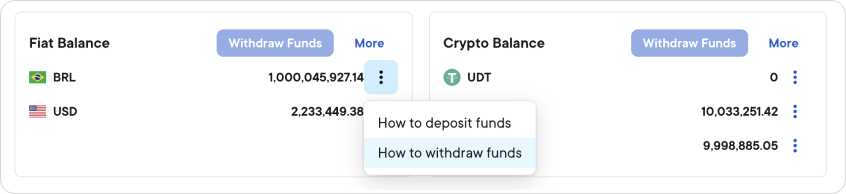
Select Withdraw Funds. The Withdraw funds panel opens on the right side of the screen.
Under Amount to withdraw, enter the amount you want to withdraw. The available balance for that currency is displayed below the field. The amount you enter must be greater than zero and cannot exceed your available balance.
Under Select bank account (fiat) or Select wallet (crypto), select a payout destination from the dropdown.
If no destination is available, your organization may not have registered one for that currency yet. If your user has permission to manage your organization's onboarding details, you can register one:
- Crypto: Settings > Transfers > Crypto wallets. See Add a crypto wallet.
- Fiat: Settings > Transfers > Bank accounts. See Add a bank account.
If you do not have that permission, ask your organization administrator.
A newly registered crypto wallet is not available straight away, because Ripple reviews it first. If a wallet shows as Approved but still is not available as a destination, contact Ripple support.
- Review the processing time information in the panel.
- Click Withdraw to submit your request.
The Withdraw button remains inactive until you enter a valid amount and select a payout destination.
After you click Withdraw, the panel closes and your request is submitted for processing. You will receive an email confirmation when Ripple initiates the transfer.
Withdrawals are typically processed within 2 business days. During this time, Ripple will verify your payout destination, complete approvals and compliance checks, and initiate the fund transfer. Once processed, your balance updates automatically and the funds will appear in your account (or your wallet for crypto withdrawals).
If a problem occurs while submitting your request, an error message appears in the Payments Direct UI. Contact Ripple support if the issue persists.