If your account uses pre-funding, you can view deposit instructions from the Account balance widget on the Home page. Ripple provides separate instructions for fiat currencies (bank wire) and crypto currencies (wallet address).
The Account balance widget is visible only for accounts using pre-funding. Deposit instructions are not available in the UAT environment.
For more information about pre-funding and other funding methods, see Funding methods.
To view fiat deposit instructions and initiate a bank transfer:
On the Home page, locate the Account balance widget.
Find the fiat currency you want to deposit, then click the options menu icon (⋮) to the right of the balance.
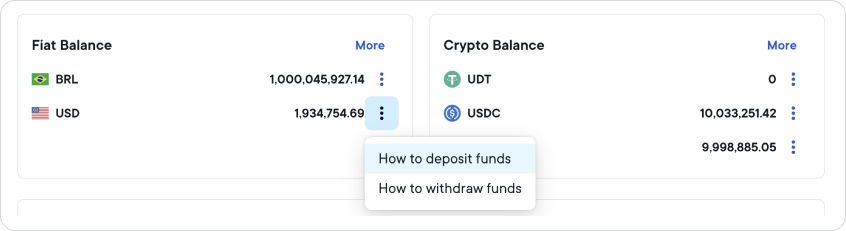
Select How to deposit funds. The Deposit Funds panel opens on the right side of the screen.
The panel displays deposit instructions for both domestic transfers and international wire transfers. Each section includes the bank account details required to complete the transfer.
Use the bank account details shown to initiate the transfer from your bank. To copy all the details for a transfer type, click Copy all transfer info.
Your account balance updates once the funds have been received and processed. Fiat deposits are processed during standard banking hours and may not be reflected immediately.
If deposit instructions are not available for your currency, contact Ripple support or your Ripple liaison.
To view crypto deposit instructions and send a transfer:
On the Home page, locate the Account balance widget.
Find the crypto currency you want to deposit, then click the options menu icon (⋮) to the right of the balance.
Select How to deposit funds. The Deposit Funds panel opens on the right side of the screen.
The panel displays your Ripple wallet address and blockchain network. If a destination tag is required for your wallet, it is also shown.
Send the crypto assets from your external wallet (for example, a custodial wallet, exchange, or DEX) to the wallet address shown.
ImportantAlways use the wallet address and blockchain network shown in the panel. Sending assets to the wrong address or on the wrong network may result in permanent loss of funds.
Each transaction must exceed the equivalent of 1 USD in value. Transactions below this threshold are treated as spam and will not be processed, including during testing.
To copy the wallet address or destination tag, click the copy icon next to the value. To copy all wallet details at once, click Copy all transfer info.
Your balance updates once the deposit is confirmed on the blockchain network. Confirmation typically takes several minutes, depending on the network.
If a wallet address is not displayed or the panel shows an error, contact Ripple support or your Ripple liaison.