Step-up approvals require named approvers for large transactions. You set an amount for a wallet and asset. Transactions of that amount or less use the wallet's usual approval group. Transactions of more than that amount wait for the approvers you name on the rule.
For example: "Transfers of up to 50,000 XRP use our standard approvers. Anything more than 50,000 XRP needs 2 of 3 finance approvers."
A step-up approval is an APPROVAL policy rule.
- Scope. A step-up approval rule applies to outgoing transactions of one asset from one wallet.
- Threshold. The rule fires when a single transaction's amount is greater than the threshold. A transaction for exactly the threshold amount doesn't fire the rule.
- Tiers. You can create several rules with different thresholds for the same wallet and asset. When more than one rule fires, the rule with the highest threshold applies.
- Replaces the default approval group. When a rule fires, its approvers and required count replace the wallet or organization transaction approval group for that transaction. The rule doesn't add to the approval group. When no rule fires, the usual approval group applies. See Wallet-level transaction approvals.
- Doesn't let a wallet send on its own. The wallet still needs a
LIMITrule for the asset. Ripple Custody (Wallet) checks limits first. If a transaction exceeds a limit, Ripple Custody (Wallet) rejects it without asking any approvers.
A treasury wallet has a default approval group, a 500,000 XRP per-transaction limit, and two step-up approval rules:
| Rule | Threshold | Approvers |
|---|---|---|
| Finance | More than 50,000 XRP | 2 of 3 finance approvers |
| Executive | More than 100,000 XRP | 3 of 5 executive approvers |
| Transaction | Result |
|---|---|
| 40,000 XRP | The default wallet approval group approves it. |
| 50,000 XRP | The default wallet approval group approves it, because the amount isn't more than the threshold. |
| 75,000 XRP | 2 of 3 finance approvers must approve it. |
| 150,000 XRP | 3 of 5 executive approvers must approve it. |
| 600,000 XRP | The limit blocks it. Ripple Custody (Wallet) doesn't create an approval request. |
Required role: Owner or Administrator.
- Open the wallet and go to the Policy tab.
- Select Add a new rule.
- On the Direction step, select Outbound, and then select Next.
- On the Rule step, select Approval, and then select Next.
- On the Conditions step, select the asset, and then enter the amount in Require approval when the amount is over.
- Under Approvers, select the approvers, and set Threshold to the number of approvals you require.
- Under Approval timeout, select 5, 15, or 30 minutes, or 1, 2, 4, 12, or 24 hours. The default is 1 hour. Select Next.
- On the Confirm step, review the rule, and then select Add policy rule. Approval rules skip the Scope and Advanced steps.
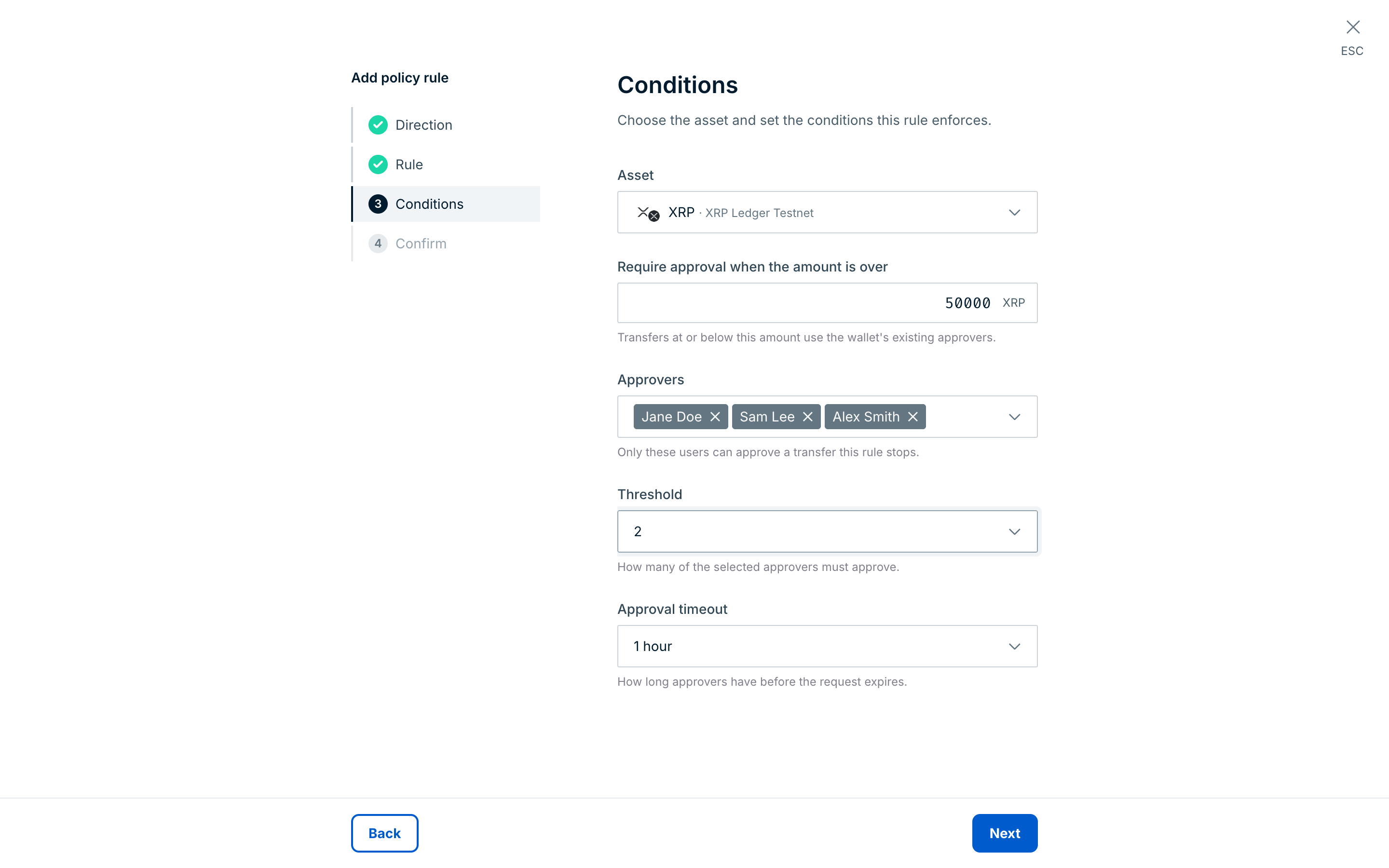
If your organization has a Policy rules approval group, the new rule takes effect only after those approvers approve it.
POST /v2/vaults/{vaultId}/wallets/{walletId}/policy-rules{
"trigger": "OUTBOUND_INITIATED",
"assetId": "3::XRP",
"definition": {
"kind": "APPROVAL",
"approval": {
"amount": {
"threshold": "50000",
"operator": "GT",
"aggregation": "SINGLE_TX"
},
"users": {
"userIds": [
"8617b5b5-dfcf-4ffc-9f46-f7cec35a88bd",
"2c0e7f3a-91d4-4b6e-a5c8-3f1d9e0b7a42",
"b5d9a1e6-4c2f-4e8b-9a73-0d6c1f8e2b95"
]
},
"requiredApprovals": 2,
"timeoutDuration": "3600s"
}
}
}| Field | Required | Rules |
|---|---|---|
trigger | Yes | Set to OUTBOUND_INITIATED. |
assetId | Yes | The asset's registry ID. You can't apply a step-up approval rule to all assets. |
matchers | No | Leave empty. Step-up approval rules don't support matchers. |
approval.amount.threshold | Yes | Decimal amount in the asset's units. Use a different threshold from every other step-up approval rule on the same wallet and asset. |
approval.amount.operator | Yes | Set to GT. |
approval.amount.aggregation | Yes | Set to SINGLE_TX. |
approval.users.userIds | Yes | One or more distinct user IDs from your organization. |
approval.requiredApprovals | Yes | At least 1, and no more than the number of approvers. |
approval.timeoutDuration | No | Between "300s" (5 minutes) and "86400s" (24 hours), in whole seconds. The default is 1 hour. If you leave it out, the API doesn't return this field when you read the rule. |
The API returns the rule with status RULE_CREATION_APPROVAL_PENDING. The rule then follows the policy rule lifecycle.
| Code | Cause |
|---|---|
PAL006.040 | The rule is invalid, and the message names the problem. For example, the rule has matchers or uses GTE. Other causes include an aggregation other than SINGLE_TX, a duplicate approver, or a requiredApprovals value greater than the number of approvers. A timeout shorter than 5 minutes or longer than 24 hours is also invalid. |
PAL006.039 | Another step-up approval rule on the wallet and asset already uses the same threshold. |
PAL006.048 | The wallet has compliance screening integrations turned on. You can't use step-up approval rules and screening on the same wallet. |
PAL006.038 | Step-up approval rules aren't available for your organization. |
Ripple Custody (Wallet) checks that approver IDs have a valid format, but doesn't check that the users are active. If you remove or block an approver, review the step-up approval rules that name them. If a tier can no longer reach its required approvals, its transactions wait until they expire.
- The transaction passes its limit checks.
- If a step-up approval rule fires, Ripple Custody (Wallet) creates an approval request for the rule's approvers. The request keeps the approvers, required count, and timeout that the rule has when Ripple Custody (Wallet) creates the request. If you delete or replace the rule later, pending requests don't change.
- The transaction waits in
POLICY_CHECK_PENDINGwhile approvers respond. - The transaction then continues or stops:
- Approved: The transaction moves to
POLICY_CHECK_PASSEDand continues to signing. - Rejected: The transaction moves to
REJECTEDwith reasonPAL006.044(approval requirement not met). - Timed out: The transaction moves to
REJECTEDwith reasonPAL006.045(approval expired). - Invalid rule: If the rule's approval requirement is invalid, Ripple Custody (Wallet) rejects the transaction with
PAL006.047. It never approves the transaction automatically.
- Approved: The transaction moves to
Approvers see step-up approval requests with their other transaction approvals, in the web console and the mobile app. In the console, the transaction page shows Approval needed: Create transaction, the time left to respond, and Approve and Skip buttons. The approvals API and APPROVAL webhooks show these requests with source type TRANSACTION_GATE.
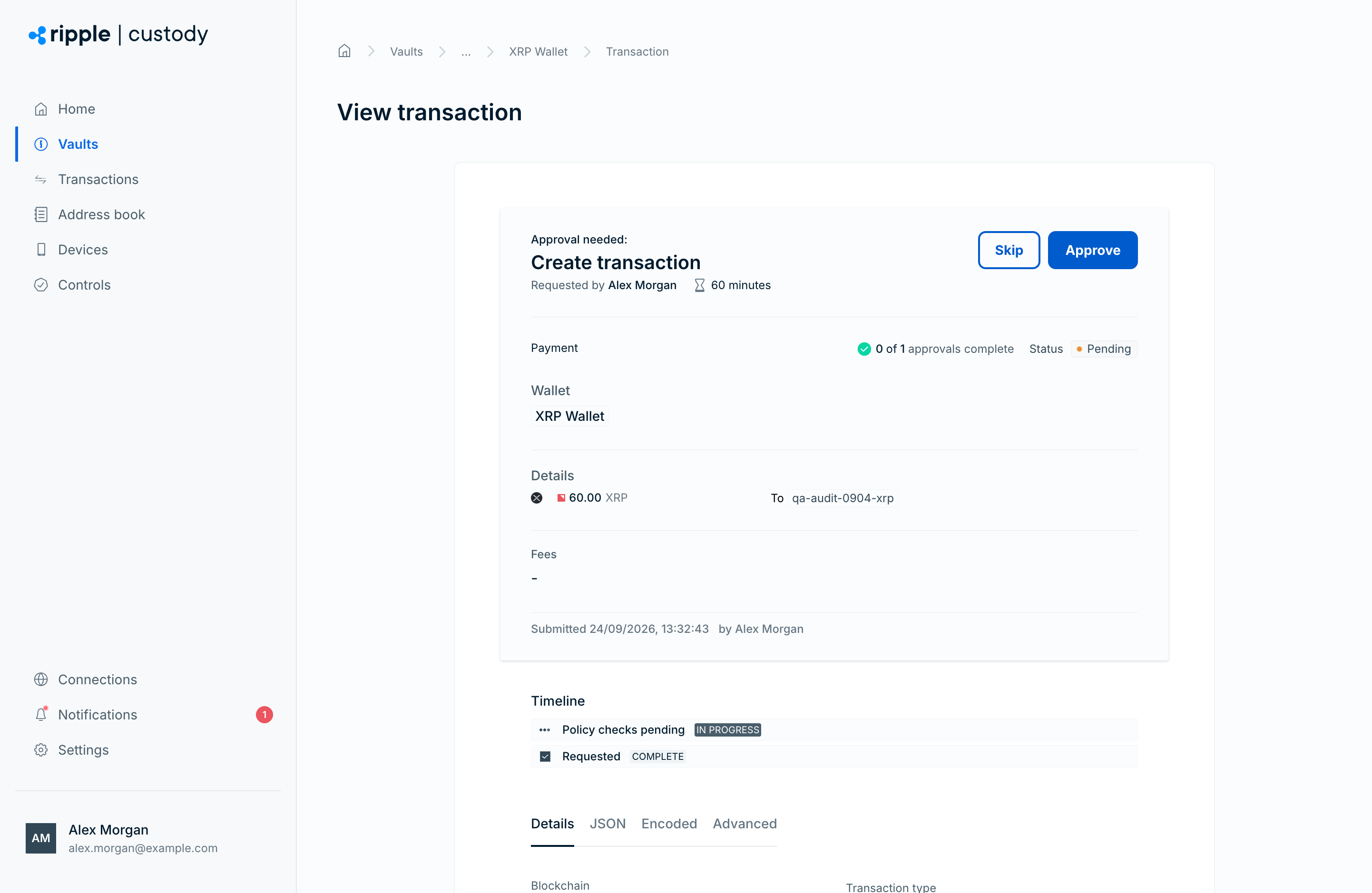
If the user who created the transaction is one of the rule's approvers, they can approve it.
Step-up approval rules don't apply to sweeps, Web3 signing, plaintext signing, passkey signing, or passkey transfers.
Step-up approvals add more approvers to large transactions. They don't ask the user who creates the transaction to sign in again, for example with a passkey or hardware security key. Ripple Custody (Wallet) doesn't offer step-up authentication.