Every transaction, outgoing or incoming, moves through a series of statuses until it's confirmed on the blockchain, rejected, or failed. The console lists every transaction for a wallet, and for all wallets across your organization, with its current status. Open a transaction to see its full stage timeline and details. You can also follow a transaction's progress through the API, or with webhooks that notify you when a transaction changes status. For what each status means, see How transactions work.
To get real-time notifications instead of polling, see Webhooks.
| Action | Console role | Console procedure | API procedure |
|---|---|---|---|
| List transactions | All roles | View the transaction list | List transactions |
| Search and filter transactions | All roles | Search and filter transactions | List transactions |
| Filter by origin or destination | All roles | Search and filter transactions | Filter transactions by origin or destination |
| View a transaction | All roles | View a transaction | Get a transaction |
| Read the recipient and quantity of a contract-token transfer | - | - | Read contract-token transfers |
| Track a transaction to confirmation | All roles | View a transaction | Track the transaction lifecycle |
Permissions: In the console, every role can view transactions. See User roles and permissions. The API procedures need an API credential of type TRANSACTIONS. See Prerequisites.
To use the API procedures on this page, you need:
- An API credential of type
TRANSACTIONS. It grants access to creating and managing transactions. Create credentials in the console. See Manage API credentials and Credential types. - An access token. Exchange your credential's
clientIdandclientSecretfor an access token. See Authenticate.
For the base URLs, token lifetime, pagination, filtering, and error format that every endpoint shares, see API conventions.
To view transactions in the console:
- Open the transaction list:
- To view one wallet's transactions, open the wallet and select its Transactions tab.
- To view transactions for all wallets across your organization, select Transactions in the main menu.
The list shows each transaction's Type, Details, Status, and Date. A wallet's list includes deposits into the wallet as well as transactions it sent. To sort the list, click the Status or Date column heading. Frozen transactions carry a Frozen label in the transaction list.
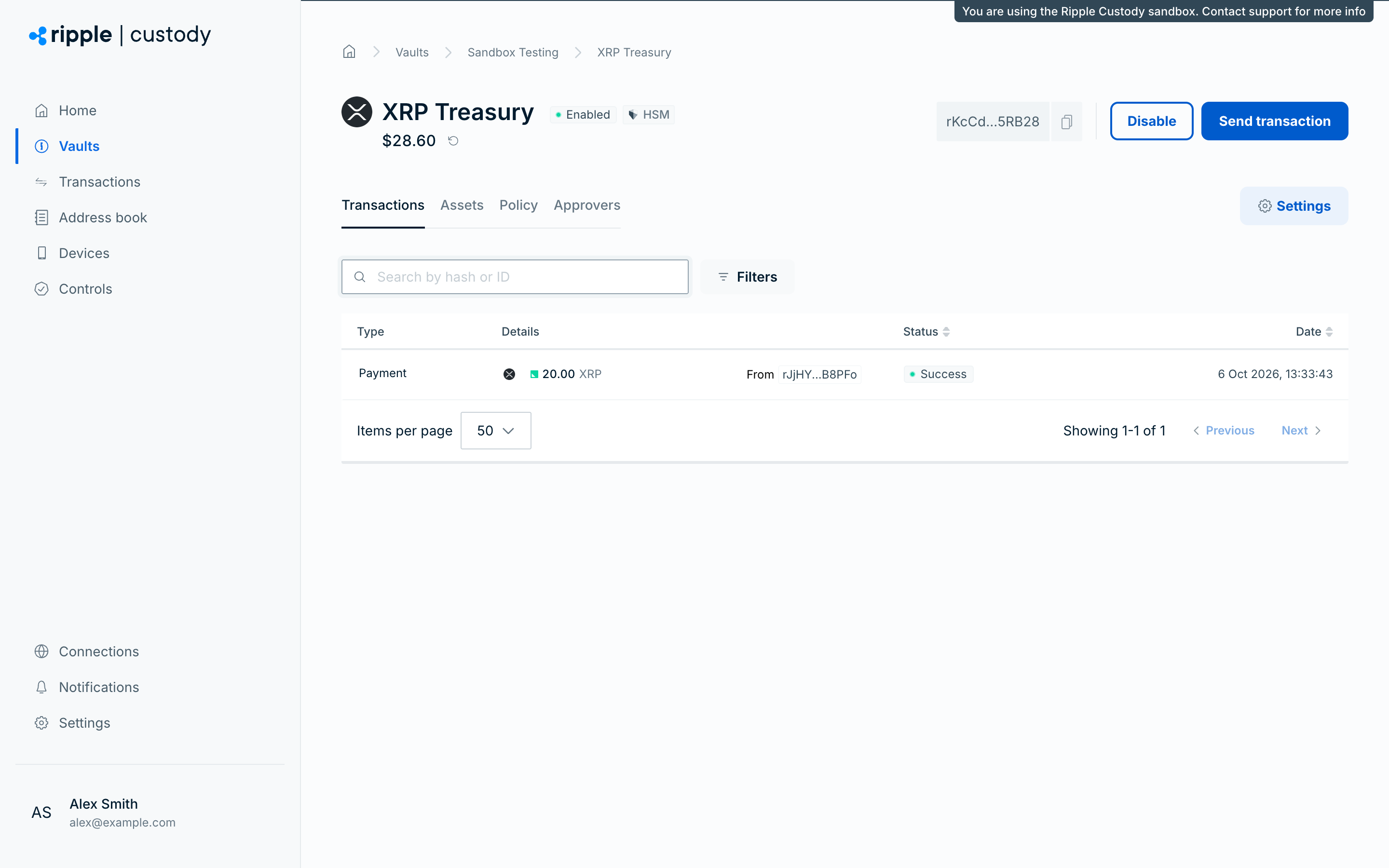
To find specific transactions in the console:
- Open the transaction list. See View the transaction list.
- To find a transaction by its hash or ID, enter the value in the Search by hash or ID box.
- To filter the list, click Filters and choose a category:
- Amount — Enter a From and To range and click Apply, or choose one of the Quick filters.
- Asset — Select one or more assets.
- Date — Choose a preset (Today, Last 48 hours, Last 7 days, Last 30 days, or This month) or Custom to set your own range.
- Destination — Select from Wallets or the Address book, or paste a Custom address to include or exclude.
- Source — Select from Wallets or the Address book, or paste a Custom address to include or exclude.
- Status — Select one or more statuses, such as Pending, Success, or Failed.
Each active filter appears as a chip, and the Filters button shows how many categories are active. A transaction must match every filter you set. To remove all filters, click Clear filters.
To view a transaction in the console:
- In a wallet's Transactions tab, click a transaction to display a summary of the transaction details and current status.
- Click View transaction to open the full transaction page, which shows the status timeline and the Details, JSON, Encoded, and Advanced tabs.
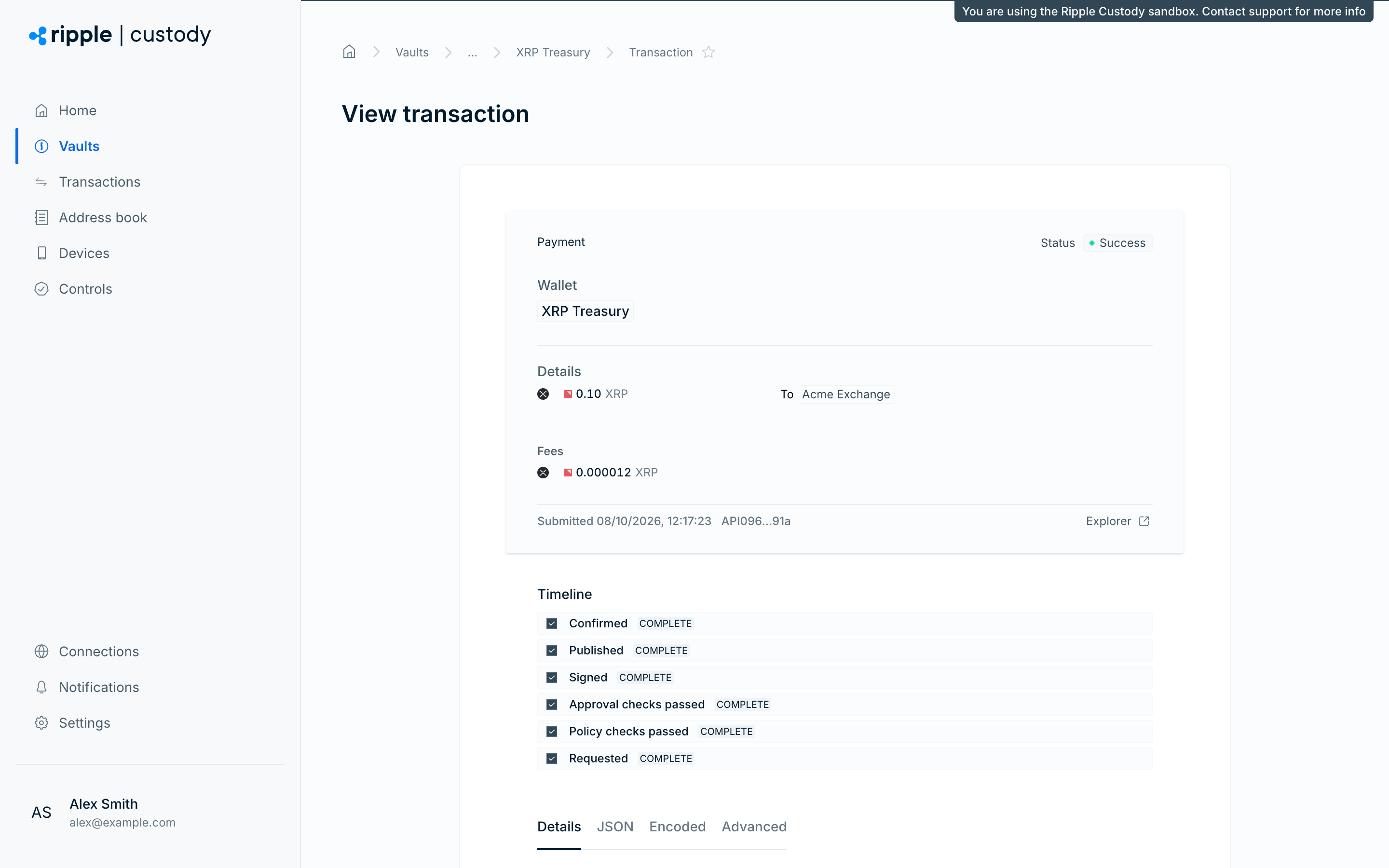
To freeze or unfreeze an incoming transaction from its transaction page, see Configure transaction freeze controls.
Retrieve a single transaction with GET /v2/vaults/{vaultId}/wallets/{walletId}/transactions/{transactionId} to check its current state. For the full schema, see Get a transaction in the API reference.
curl "https://api.sandbox.palisade.co/v2/vaults/$VAULT_ID/wallets/$WALLET_ID/transactions/$TRANSACTION_ID" \
  -H "Authorization: Bearer $ACCESS_TOKEN"
The response is the same transaction object, updated. If the transaction belongs to a different wallet, the request returns HTTP 404 with the message transaction not found and the reason PAL010.004. When the transfer completes, status is CONFIRMED, hash holds the blockchain transaction hash, feeQty holds the network fee actually paid, confirmedAssetChanges records the balance movements observed on chain, and reasons holds the blockchain result, such as Blockchain status: tesSUCCESS on the XRP Ledger.
For an outgoing contract-token transfer, such as an ERC-20 or TRC-20 transfer, the recipient wallet address and token quantity don't appear at the top level of the transaction. Read them from the transaction's asset changes instead.
To read the recipient and quantity of a contract-token transfer:
- Get the transaction. See Get a transaction.
- Iterate the entries in
proposedAssetChanges(before confirmation) orconfirmedAssetChanges(after confirmation). - Skip entries with
purpose: FEE. - For each
TRANSFERentry, readdestination.addressfor the recipient wallet andqtyfor the token quantity sent to that wallet.
The same lookup works for native transfers: the TRANSFER entry mirrors the top-level fields, so a single code path handles both transfer types.
Why the top-level fields differ. Native asset transfers (ETH, BTC, TRX, XRP, SOL) move value directly from the origin wallet to the recipient wallet. The top-level destinationAddress names the recipient, and the top-level qty is the amount the recipient receives.
Contract-token transfers (ERC-20, TRC-20, BEP-20, ERC-721, and the other token-standard transfers in Supported token standards) work differently. The blockchain runs a call against the token contract, and the contract's internal ledger credits the recipient wallet.
Outgoing transfers: top-level destination names the execution target. For an outgoing transfer — one your organization sends — the top-level destination (and its deprecated equivalent destinationAddress) is the blockchain execution target: the address Ripple Custody (Wallet) submits to the blockchain after it compiles the transaction. For an outgoing contract-token transfer, compilation also sets the top-level qty to "0" and the top-level asset to the blockchain's native asset.
| Outgoing transfer type | Top-level destination.address | Top-level qty | Top-level asset |
|---|---|---|---|
| Native asset (for example, ETH, TRX, SOL, BTC, XRP) | The recipient wallet address | The amount the recipient receives | The transferred asset |
| Contract token (for example, ERC-20, TRC-20, BEP-20) | The token contract address | Typically "0" — no native asset moves to the contract | The blockchain's native asset (for example, TRX for a TRC-20 transfer) |
Incoming transfers keep the recipient at the top level. This normalization applies only to outgoing transfers. See Contract-token deposits.
Use the structured destination object instead of the deprecated destinationAddress. destination.address holds the same address, and destination also carries wallet, vault, and counterparty context when Ripple Custody (Wallet) can resolve them. For new integrations, read destination.address.
Asset-change arrays. Every transaction exposes two arrays of AssetChange entries that describe how balances move:
proposedAssetChanges— Asset changes that Ripple Custody (Wallet) predicts before confirmation. Ripple Custody (Wallet) populates this array as soon as it compiles the transaction, so you can read it while the transaction is still pending. These values are indicative and can change if the on-chain execution differs from the prediction.confirmedAssetChanges— Asset changes that Ripple Custody (Wallet) records after confirmation, once the transaction reachesCONFIRMED. These values reflect what happened on chain.
Each entry contains these fields:
purpose— eitherTRANSFER(asset movement) orFEE(network fees).asset— the asset that moves.qty— the amount that moves.source— the wallet the asset moves from. OnFEEentries,sourceidentifies the fee payer, which can differ from the transfer source when a dedicated fee wallet pays the network fee.destination— the wallet the asset moves to. Populated onTRANSFERentries; not populated onFEEentries.
Both source and destination hold the on-chain address, the wallet ID and vault ID when the wallet belongs to your organization, and any subaccount address the chain requires.
Example: TRC-20 / ERC-20 transfer. The following response shows an outgoing USDT transfer on Tron (TRC-20). USDT on Ethereum, USDC on any EVM chain, and any other ERC-20, TRC-20, or BEP-20 transfer follow the same shape — only the contract, wallet, and asset symbol change.
{
  "id": "019c94f1-cc8c-79b4-9c0f-bc7edaabc267",
  "walletId": "019c8a3b-5678-7def-1234-567890abcdef",
  "vaultId": "019c8a2f-1234-7abc-9def-abcdef123456",
  "status": "CONFIRMED",
  "action": "PALISADE_TRANSFER",
  "blockchain": "TRON",
  "asset": { "symbol": "TRX", "standard": "NATIVE" },
  "originAddress": "TSourceWallet0000000000000000000000",
  "origin": {
    "address": "TSourceWallet0000000000000000000000",
    "walletId": "019c8a3b-5678-7def-1234-567890abcdef"
  },
  "destinationAddress": "TR7NHqjeKQxGTCi8q8ZY4pL8otSzgjLj6t",
  "destination": {
    "address": "TR7NHqjeKQxGTCi8q8ZY4pL8otSzgjLj6t",
    "type": "EXTERNAL"
  },
  "qty": "0",
  "proposedAssetChanges": [
    {
      "purpose": "TRANSFER",
      "asset": {
        "symbol": "USDT",
        "standard": "ERC20",
        "contract": "TR7NHqjeKQxGTCi8q8ZY4pL8otSzgjLj6t"
      },
      "qty": "125.500000",
      "source": {
        "address": "TSourceWallet0000000000000000000000",
        "walletId": "019c8a3b-5678-7def-1234-567890abcdef",
        "vaultId": "019c8a2f-1234-7abc-9def-abcdef123456"
      },
      "destination": {
        "address": "TRecipientWallet00000000000000000000"
      }
    },
    {
      "purpose": "FEE",
      "asset": { "symbol": "TRX", "standard": "NATIVE" },
      "qty": "13.451000",
      "source": {
        "address": "TSourceWallet0000000000000000000000",
        "walletId": "019c8a3b-5678-7def-1234-567890abcdef"
      }
    }
  ],
  "confirmedAssetChanges": [
    {
      "purpose": "TRANSFER",
      "asset": {
        "symbol": "USDT",
        "standard": "ERC20",
        "contract": "TR7NHqjeKQxGTCi8q8ZY4pL8otSzgjLj6t"
      },
      "qty": "125.500000",
      "source": {
        "address": "TSourceWallet0000000000000000000000",
        "walletId": "019c8a3b-5678-7def-1234-567890abcdef",
        "vaultId": "019c8a2f-1234-7abc-9def-abcdef123456"
      },
      "destination": {
        "address": "TRecipientWallet00000000000000000000"
      }
    },
    {
      "purpose": "FEE",
      "asset": { "symbol": "TRX", "standard": "NATIVE" },
      "qty": "13.451000",
      "source": {
        "address": "TSourceWallet0000000000000000000000",
        "walletId": "019c8a3b-5678-7def-1234-567890abcdef"
      }
    }
  ]
}
Read this response as follows:
destinationAddressanddestination.addressboth holdTR7NHqjeKQxGTCi8q8ZY4pL8otSzgjLj6t— the on-chain USDT contract that Tron runs the transfer against, not the recipient.- Top-level
qtyis"0"because no native TRX moves to the contract. The TRX in theFEEentry is the network fee. - Top-level
assetis TRX, the blockchain's native asset — compilation normalizes it along withdestinationandqty. USDT appears only in theTRANSFERasset-change entries. - The recipient wallet
TRecipientWallet00000000000000000000and the token quantity125.500000appear in theTRANSFERentry ofconfirmedAssetChanges(orproposedAssetChangeswhile the transaction is still pending).
The same pattern applies to ERC-20 transfers on Ethereum, Arbitrum, Base, Polygon, Avalanche, and BNB Smart Chain: destination.address names the ERC-20 contract (for example, the USDC contract 0xA0b86991c6218b36c1d19D4a2e9Eb0cE3606eB48 on Ethereum), and the TRANSFER asset-change entry holds the recipient wallet.
List a wallet's transactions with GET /v2/vaults/{vaultId}/wallets/{walletId}/transactions. To list transactions across your whole organization, use GET /v2/transactions. Both endpoints accept the same filter, search, sort, and pagination parameters:
- Filters —
filter.<field>.<operator>query parameters. Filterable fields includestatus,type(the transactionaction, such asPALISADE_TRANSFERfor transfers orPALISADE_MANAGEDfor XRP Ledger transaction types),blockchain,assetSymbol,qty,createdAt,updatedAt,origin,destination,transactionId,transactionHash,externalId, andcorrelationId. Operators depend on the field — for exampleeq,notEq,in, andnotInfor enums;gt,gte,lt, andlteforqty; andbefore,after,between.start,between.end, andrelativeDaysfor timestamps. A transaction must match every filter you set. Fororiginanddestinationmatching rules, see Filter transactions by origin or destination. Use a negativerelativeDaysvalue, such as-7for the last seven days. To find a transaction by its blockchain hash, usefilter.transactionHash.containsorfilter.transactionHash.startsWith, or pass the hash assearch. - Search —
searchruns a case-insensitive free-text search over transaction ID, transaction hash, external ID, correlation ID, asset symbol, origin address, and destination address. - Sort —
pagination.orderByacceptscreated_at,updated_at,amount, orstatus. Setpagination.ordertoSORT_ORDER_ASCorSORT_ORDER_DESC. - Pagination —
pagination.pageSizesets the page size (default 50, maximum 1000; a larger value returns HTTP 400). To get the next page, pass the previous response'sfilter.nextPageTokenaspagination.pageToken. Use thepagination.*form:GET /v2/transactionsdoesn't accept a top-levelpageSize.
curl "https://api.sandbox.palisade.co/v2/vaults/$VAULT_ID/wallets/$WALLET_ID/transactions?filter.status.eq=CONFIRMED&pagination.pageSize=10" \
  -H "Authorization: Bearer $ACCESS_TOKEN"
curl "https://api.sandbox.palisade.co/v2/transactions?filter.createdAt.relativeDays=-7&pagination.orderBy=created_at&pagination.order=SORT_ORDER_DESC" \
-H "Authorization: Bearer $ACCESS_TOKEN"Both endpoints return a transactions array of transaction objects and a filter object with pagination metadata: total, plus nextPageToken when there's a next page and previousPageToken when there's a previous one. A wallet's list includes deposits into the wallet as well as transactions it sent.
{
  "transactions": [
    { "id": "01a11af7-f22d-7474-ac46-86c7d4680c3d", "status": "REJECTED", "action": "PALISADE_TRANSFER", "...": "..." }
  ],
  "filter": {
    "previousPageToken": "eyJsaW1pdCI6Miwib2Zmc2V0IjowfQ==",
    "nextPageToken": "eyJsaW1pdCI6Miwib2Zmc2V0Ijo0fQ==",
    "total": 87
  }
}
For complex filters, send them as a JSON body to POST /v2/transactions:list or POST /v2/vaults/{vaultId}/wallets/{walletId}/transactions:list instead. The body takes filter and pagination objects with the same fields, and search as a string. For the full schemas, see List wallet transactions (with a request body) and List transactions (with a request body) in the API reference. For example:
curl -X POST "https://api.sandbox.palisade.co/v2/transactions:list" \
  -H "Authorization: Bearer $ACCESS_TOKEN" \
  -H "Content-Type: application/json" \
  -d '{
    "filter": {
      "status": { "in": ["REJECTED", "FAILED"] },
      "createdAt": { "relativeDays": -7 }
    },
    "pagination": { "pageSize": 50, "orderBy": "created_at", "order": "SORT_ORDER_DESC" }
}'On the wallet-level endpoints, the top-level pageSize, pageToken, and correlationId parameters still work but are deprecated; use pagination.pageSize, pagination.pageToken, and filter.correlationId. The address-only filter.originAddress.* and filter.destinationAddress.* filters are also deprecated — see Filter transactions by origin or destination.
To list transactions by where they come from or go to, add filter.origin.* or filter.destination.* query parameters to GET /v2/transactions or GET /v2/vaults/{vaultId}/wallets/{walletId}/transactions. Each filter matches the origin or destination of a transaction by any of these identifiers:
- The blockchain address
- The wallet ID or address book entry ID
- The counterparty ID
| Operator | Behavior |
|---|---|
eq, in | Matches when any identifier equals a value you supply. Address matching is case-sensitive: supply the address in the form the transaction records, such as the checksummed form of an EVM address. |
notEq, notIn | Matches only when no identifier equals a value you supply. |
contains, startsWith, endsWith | Matches the address only. Pattern matching is case-insensitive. |
isNull | Checks whether the origin or destination is empty. |
Example: List a wallet's transactions sent to a specific counterparty.
curl -X GET "https://api.sandbox.palisade.co/v2/vaults/$VAULT_ID/wallets/$WALLET_ID/transactions?filter.destination.eq=$COUNTERPARTY_ID" \
  -H "Authorization: Bearer $ACCESS_TOKEN"
Example: List transactions received from either of two addresses.
curl -X GET "https://api.sandbox.palisade.co/v2/transactions?filter.origin.in=0x55502b9d5a68b0F8a48384352295BeD968aD8AA4&filter.origin.in=0x8dCd82eC41C41627D987830128198aff4A392D89" \
  -H "Authorization: Bearer $ACCESS_TOKEN"
A transaction must match every filter you set.
Ripple Custody (Wallet) deprecates filter.originAddress.* and filter.destinationAddress.*. These filters match the blockchain address only. Their exact and list operators (eq, notEq, in, notIn) are case-sensitive, and their pattern operators are case-insensitive. For new integrations, use filter.origin.* and filter.destination.*.
A transaction moves through a series of status values from creation to completion:
REQUESTED— Ripple Custody (Wallet) accepted the transaction.POLICY_CHECK_PENDING→POLICY_CHECK_PASSED— Ripple Custody (Wallet) evaluates your policy rules and collects any required approvals.POLICY_CHECK_PASSEDmeans the transaction passed both policy checks and approvals.COMPILATION_PENDING→COMPILED— Ripple Custody (Wallet) builds the transaction for the target blockchain.SIGNATURE_PENDING→SIGNED— Ripple Custody (Wallet) signs the transaction.PUBLISH_PENDING→PUBLISHED— Ripple Custody (Wallet) submits the transaction to the blockchain.CONFIRMATION_PENDING→CONFIRMED— the blockchain confirms the transaction.
Stages can complete faster than you poll, so you won't necessarily see every status. For example, an XRP Ledger transfer that needs no approvals can reach POLICY_CHECK_PASSED in under a second and CONFIRMED within about ten seconds, and a poll can go straight from POLICY_CHECK_PASSED to SIGNED or PUBLISHED. Don't build logic that waits for a particular intermediate status. Statuses only move forward, so compare a status's position in this list instead.
A transaction can end in REJECTED (a policy or approval check declined it) or FAILED (Ripple Custody (Wallet) couldn't complete it). A policy rejection can happen within moments of creation, so a transaction can go straight from REQUESTED to REJECTED. The problems array contains structured details, including a retryability value of RETRYABLE or NOT_RETRYABLE. For example, a transfer rejected because the wallet's transaction limits aren't active:
{
  "status": "REJECTED",
  "problems": [
    {
      "code": 9,
      "reason": "PAL006.005",
      "domain": "policy-service",
      "message": "Transaction limits for XRP exist but are not active. Check limit approval status.",
      "retryability": "NOT_RETRYABLE",
      "metadata": {}
    }
  ],
  "reasons": [
    "Transaction limits for XRP exist but are not active. Check limit approval status."
  ]
}
The older reasons array is deprecated, but check it when problems is empty: for some blockchain failures, problems is empty and reasons holds the blockchain result, such as Blockchain status: tecUNFUNDED_PAYMENT. For the format of errors that the API returns directly, see Error codes.
Two other fields help you follow a transaction:
history— a read-only list of business events for the transaction, such as status changes, policy decisions, approval votes, and freeze actions, each with anevent,stage, andoutcome. It can be empty, even for a confirmed transfer.expiresAt— when set, the time after which Ripple Custody (Wallet) rejects the transaction if it isn't confirmed. It'snullor absent when no expiry applies.
Poll GET /v2/vaults/{vaultId}/wallets/{walletId}/transactions/{transactionId} until the status reaches CONFIRMED, REJECTED, or FAILED, or subscribe to transaction events instead of polling — see Manage webhooks via the API. For a full description of each stage, see How transactions work.
- Send assets — Send payments in the console, and estimate fees and create transfers via the API
- How transactions work — Transaction stages, statuses, and console status badges
- Receive assets — How deposits appear, including deposits from more than one sender
- Ripple Custody (Wallet) API reference — Full request and response schemas