This page outlines the lifecycle of a payment in Payments Direct, provides more details about each payment state, and explains how to find the current state of a payment.
A payment typically moves through the following phases in Payments Direct:
Initiated: The payment process begins when you submit a payment request that references an accepted quote. Payments Direct creates a payment in the
INITIATEDstate.Validating: The payment state changes to
VALIDATINGwhile the platform runs internal checks, such as validating payment details, checking limits, and reserving funds from your available balance.- If these checks succeed, the payment continues to
TRANSFERRING. - If a predictable, user-correctable issue is found (for example, invalid or missing data, account status, or compliance rules), the payment moves to the terminal
DECLINEDstate. - If an unexpected platform or system issue prevents processing, the payment moves to the terminal
FAILEDstate.
- If these checks succeed, the payment continues to
Transferring: As the payment moves through the network to the beneficiary, the payment state becomes
TRANSFERRING. The payment amount is debited from your available balance, and Ripple or a downstream partner works to complete the payment.- If a predictable, user-correctable issue is discovered at this stage (for example, the destination bank rejects the payment due to compliance rules or account status), the payment moves to the terminal
DECLINEDstate. - If an unexpected platform or system error occurs, the payment moves to the terminal
FAILEDstate.
- If a predictable, user-correctable issue is discovered at this stage (for example, the destination bank rejects the payment due to compliance rules or account status), the payment moves to the terminal
Completed: If the payment does not enter
DECLINEDorFAILEDduring the earlier phases, and the payout network successfully credits the beneficiary, the payment reaches the terminalCOMPLETEDstate. In most cases, this means the beneficiary has received the funds.Returned: In some cases, a payment that previously reached
COMPLETEDmay later be sent back by a downstream institution or the beneficiary’s bank. When this happens, the payment moves to the terminalRETURNEDstate and the funds are returned to the originator. Returns are managed by Ripple and payout partners; customers cannot directly trigger returns.
For payments using JIT funding, the lifecycle begins with an additional state before INITIATED. After the payment is created, it enters AWAITING_FUNDING while Ripple waits to receive the required funds. Once the funds arrive, the payment moves to INITIATED and follows the standard lifecycle above. If funding is not received before the deadline, the payment expires. For more information, see Funding methods.
The diagram below shows a simplified view of how a payment can move between states:
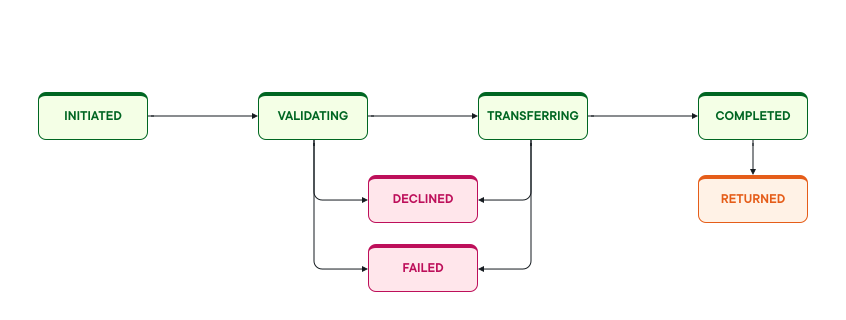
The Payment states section on this page provides reference descriptions for each state. For more details about how returns work and how to reconcile them, see Payment returns.
The paymentState field of the payment object indicates the current state of a payment. This section describes each possible value and what it means for your payment, including the new DECLINED state.
Payments Direct supports the following payment states:
| State | Description |
|---|---|
QUOTED | A quote has been created, but you haven’t accepted it yet. The quote describes the proposed exchange rate, fees, and amounts for a potential payment. When you accept the quote and create a payment, the payment’s first state transition is from QUOTED to INITIATED. |
AWAITING_FUNDING | The payment is waiting for funds to be received before it can proceed. This state applies only to payments using JIT funding. Once the required funds arrive, the payment moves to INITIATED and follows the standard lifecycle. If funds are not received before the funding deadline, the payment expires. |
INITIATED | You, the payment originator, have initiated a payment by submitting a payment request that references an accepted quote. Payments Direct creates a payment record with a unique identifier and sets paymentState to INITIATED. |
VALIDATING | Ripple validates the payment details and reserves funds from your available balance. The platform performs checks such as data validation, limits, account status, and compliance rules. If these checks succeed, the payment moves to TRANSFERRING. If the request is predictably invalid or violates business, risk, or regulatory rules, the payment moves to DECLINED. If an unexpected platform or system error occurs, the payment moves to FAILED. |
TRANSFERRING | The payment is moving through the network to the ultimate beneficiary. Funds have been reserved or debited from your available balance while Ripple and payout partners attempt to complete the payment. If a partner or internal service rejects the payment for a predictable, user-correctable reason, the payment moves to DECLINED. If an unexpected platform or system error prevents completion, the payment moves to FAILED. |
DECLINED | The payment was declined because the payment instruction is not acceptable in its current form. Typical causes include invalid or missing data, account status or limit issues, authorization problems, or regulatory and compliance rules enforced by Ripple or a downstream partner. The payment will not be completed or retried automatically. Any reserved funds are released back to the originator’s available balance. To proceed, correct the issue described in the error message and submit a new payment. |
COMPLETED | The payment has been successfully processed, and the beneficiary has been credited according to the agreed quote. This is a terminal state for payments that finish successfully. |
FAILED | The payment could not be completed due to an unexpected platform, system, or network error that Ripple does not classify as a predictable decline. The failure reason, if available, is returned in the error details. Reserved funds for the payment are released and returned to the originator’s available balance where applicable. |
RETURNED | The payment was previously marked as COMPLETED but was later returned by a downstream institution (for example, the beneficiary’s bank) after the beneficiary was initially credited. This is a terminal state. The funds are returned to the originator, and the return is visible in your payment reports and notifications. Customers cannot directly trigger returns. |
DECLINED: The platform or a downstream partner has refused to process the payment because the request is invalid or cannot be accepted in its current form. The issue is usually user-correctable (for example, fixing data, limits, or account status) and the payment is not retried automatically.FAILED: An unexpected platform or system error prevents the payment from being processed. These errors are not primarily about the validity of the payment instruction itself.RETURNED: The payment was completed and the beneficiary was initially credited, but the funds were later sent back, resulting in a terminalRETURNEDstate.
For some payments, Payments Direct returns additional execution metadata in an optional payoutExecutionDetails field on the payment object. When present, this object includes the payment rail used, timing information, and network-specific tracking references such as transaction IDs and confirmation numbers.
The field is not returned on every payment. Do not build required workflows that depend on its presence. For more information, see Payout execution details.
You can check a payment's current state and its state transitions either in the Payments Direct UI or by using the Payments Direct API.
In the Ripple Payments web UI, open the payment details for the payment you want to inspect.
- The Payment Details tab shows the payment’s transition through states on a timeline. Each entry shows the state and the timestamp when the payment reached that state.
- The Payment Object JSON tab includes the full payment object. The
paymentStatefield shows the current state of the payment.
You can also check the payment state using the Payments API:
- To check the current state of a specific payment, call the
GET /payments/{paymentId}endpoint. The response body includes thepaymentStatefield. - To check a payment’s state transition history, call the
GET /v3/payments/{paymentId}/statesendpoint. The response shows each state, when the payment reached it, and the order of transitions over time.
The state of a payment determines what has happened to the originator’s funds:
| State | Fund status |
|---|---|
AWAITING_FUNDING | No funds reserved yet. The payment is waiting for JIT funds to arrive in your Ripple ledger account. |
INITIATED | No funds reserved yet. The payment has been submitted but not yet validated. |
VALIDATING | Funds are reserved from the available balance. The originator cannot use reserved funds for other payments. |
TRANSFERRING | Funds are debited. The payment is in flight; the source amount has left the originator’s account. |
COMPLETED | Funds remain debited. Settlement is confirmed. |
FAILED | Reserved funds are released back to the available balance. No debit occurred. |
DECLINED | Reserved funds are released back to the available balance. No debit occurred. |
RETURNED | Debited funds are credited back to the available balance. Ripple handles the return automatically. |
Payments Direct sends a PAYMENT_STATE_TRANSITION webhook notification each time a payment changes state. This is the recommended approach for monitoring payment progress in production integrations, as it eliminates the need to poll.
The webhook payload uses a "thin-plus" design: it includes the paymentId and the new paymentState, along with additional context fields such as sourceCurrency, sourceAmount, destinationCurrency, payoutAmount, and beneficiaryToken.
Example webhook payload
{
  "id": "4d3f90cf-b70f-5ff1-827a-f8aa9cf84ab9",
  "eventType": "PAYMENT_STATE_TRANSITION",
  "eventVersion": 1,
  "eventData": {
    "paymentId": "5ce2c433-a96d-48d0-8857-02637a60abf4",
    "paymentState": "COMPLETED",
    "sourceCurrency": "USD",
    "sourceAmount": 100.00,
    "destinationCurrency": "BRL",
    "payoutAmount": 518.50,
    "beneficiaryToken": "cb207125-73a7-4a94-8502-a7780f1cae78",
    "createdAt": "2026-03-01T14:20:00.000Z",
    "expiresAt": "2026-04-30T14:20:00.000Z"
  },
  "createDate": "2026-03-01T14:22:46.000Z"
}Webhook delivery order is not guaranteed. Notifications may arrive out of sequence if retries occur. Always use updatedAt timestamps from the state transitions endpoint to determine the authoritative state sequence.
Webhook notifications for PAYMENT_STATE_TRANSITION events do not include error details such as reason codes. To retrieve error details for FAILED, DECLINED, or RETURNED payments, call GET /v3/payments/{paymentId} and inspect the errors[] array.
When building integration logic that reacts to payment states, follow these guidelines:
- Treat all terminal states explicitly. Handle
COMPLETED,FAILED,DECLINED, andRETURNEDas distinct outcomes with different downstream behavior. - For JIT-funded payments, monitor
AWAITING_FUNDING. If your integration usesJIT_FUNDING, track this state and ensure funds are transferred beforejitFundingExpiresAt. A payment that expires inAWAITING_FUNDINGrequires a new quote and payment. - Do not assume state order from webhooks. Use
GET /v3/payments/{paymentId}/statesto confirm the authoritative sequence if delivery order matters. - For
FAILEDandDECLINED, fetch the full payment object to retrieve error details before deciding to retry. - Implement idempotency on state handlers. Webhooks may be delivered more than once. Your handler should be safe to call repeatedly for the same
paymentIdandpaymentState. - Handle unknown states gracefully. Log and alert on unexpected state values, but do not discard the event.
| Operation | Method | Path |
|---|---|---|
| Create a payment | POST | /v3/payments |
| Get a payment by ID | GET | /v3/payments/{paymentId} |
| Get state transitions by payment ID | GET | /v3/payments/{paymentId}/states |
| Search payments | POST | /v3/payments/filter |