Version 1.16 is a SaaS release and introduces the following new features:
- Key management
- User experience
- Custody
If you are migrating to this version from version 1.14 or earlier, you must complete Steps 1, 2, and 3 in the Custody v1.15 migration guide to migrate all user entries to the new format needed for SSO integration.
For information about distribution and deployment of this version, see Distribution and deployment.
This release introduces the following key management enhancements.
Ripple Custody now supports SLIP-10 key derivation for vaults created with Thales Luna HSMs (complementing existing BIP32 capabilities). This includes ed25519 curve compatibility, ensuring improved cross-chain interoperability, enhancing flexibility and security in key management.
This feature requires Thales Luna HSM firmware version 7.8.7 or newer and it's available exclusively for newly created vaults configured with KMS Connect Luna connection.
In addition to using HSM firmware version 7.8.7 or newer, you must also use Luna Appliance Software 7.8.5-300 to be able to perform SLIP10 derivation.
Ripple Custody introduces Multi-Party Computation (MPC) as a new key management option. Ripple’s proprietary MPC solution uses a 3-of-4 threshold signing scheme, distributing key shards across customer and Ripple-hosted infrastructure to ensure no unilateral key usage and protection against shard loss. MPC supports flexible node deployment in cloud environments like AWS, GCP, and Azure, with Ripple nodes ensuring high availability and backup. Built-in shard recovery prevents data loss, while relay nodes and load balancing enable seamless scaling for enterprise needs.
This feature is currently a closed beta.
This release introduces the following user experience enhancements.
A button at the top of the page allows you to switch between the current Ripple Custody UI and the new beta UI, designed for improved performance and an enhanced experience.
Switching from the beta version to the current version of the UI 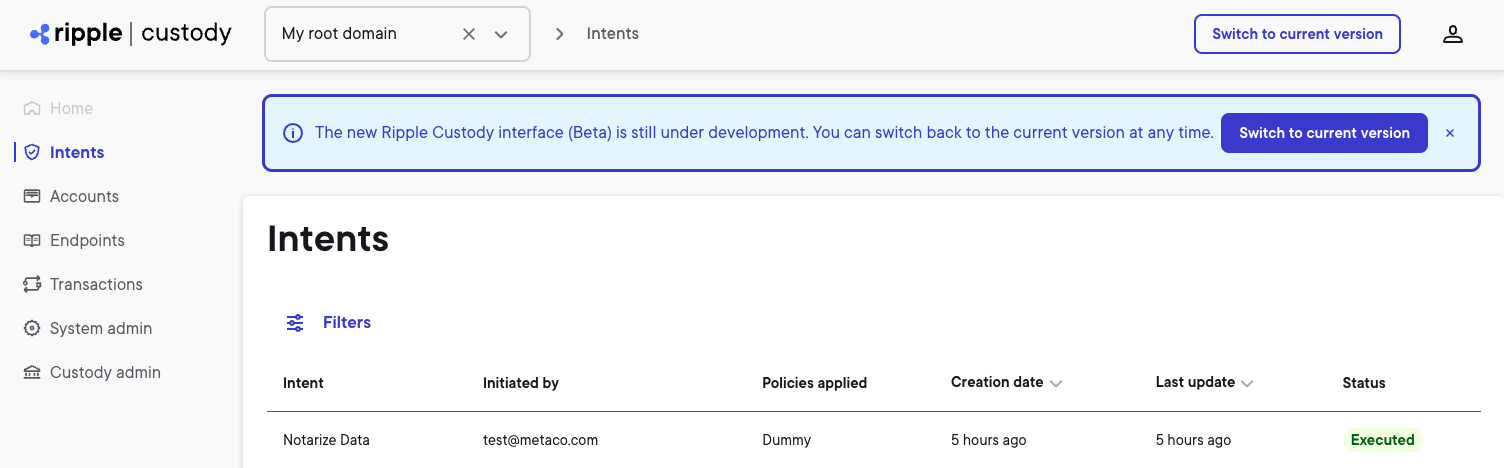
The beta UI focuses on core reading functionalities like list and details pages and introduces the following new side navigation:
- Home -- the landing page
- Intents – Lists intents, including the initiator, applied policies, creation date, last update, and status
- Accounts – Lists accounts, including the providers and ledgers that are associated with the account
- Endpoints – Lists endpoints, including their trust score, address alias, address, ledger, last update, and status
- Transactions – Lists transactions, including the date, number of transfers, the type of transaction (internal/external), the transaction’s ID on the ledger, source, destination, and value.
- System admin – Contains system management for users, domains, and policies
- Custody admin – Contains Custody administration for assets, and vaults
The Logout is now located in the user management section in the upper right.
To explore the new beta version of the Ripple Custody UI, request access through your Customer Partner Engineer (CPE) and then complete the following steps:
- Authenticate using the current version of the UI.
- At the top right, select Try beta version.
You’ll be redirected to the authentication page for the new beta version of the UI. - Authenticate a second time using the new beta version.
- Writing functionality, including intent creation, isn't available in this preview.
- You don’t need to update the Ripple Custody server address when you switch between the current and beta version. However, you need to authenticate each time you switch between the current and beta version.
This release introduces the following custody functionality enhancements.
The List transfers and the Get account balances API operations now include the following new query parameters that allow you to filter scam tokens:
ticker.validationStatusto filter on validation status, usingValidatedorNonValidatedvaluesticker.lockto filter on lock status, usingUnlocked,Locked, orArchivedvalues
This feature is currently only available through the API.
The 1.16 version will be progressively deployed across SaaS environments starting on December 2, 2024 with production environments scheduled for deployment on January 6, 2025.
Ripple takes great care in testing its applications and ensuring that there are no regressions or breaking changes. Should you experience unexpected behavior, reach out to the Support team by creating a ticket on our Support Portal or contact your Customer Partner Engineer (CPE).