Before receiving an MPT for the first time, the holder must submit an MPTokenAuthorize transaction. This creates an MPToken entry with an initial zero balance.
| Prerequisite | Additional information |
|---|---|
| An XRPL account in Ripple Custody (Vault) | View account details |
| The MPT Issuance ID (48 hex characters) | Provided by the token issuer |
| Sufficient XRP for reserves | Owner reserve + MPToken object reserve |
To opt in to an MPT:
Go to Accounts and open the account that will hold the token.
Click Create order and select Ledger-specific operations.
In Ledger, select the XRP Ledger network.
In Operation, select Opt in to token.
Select the token:
- Listed asset — Select the token from the list of registered assets.
- Unlisted asset — Enter the issuance ID that the issuer gave you. A new MPT usually isn't in the list until your account has received it.
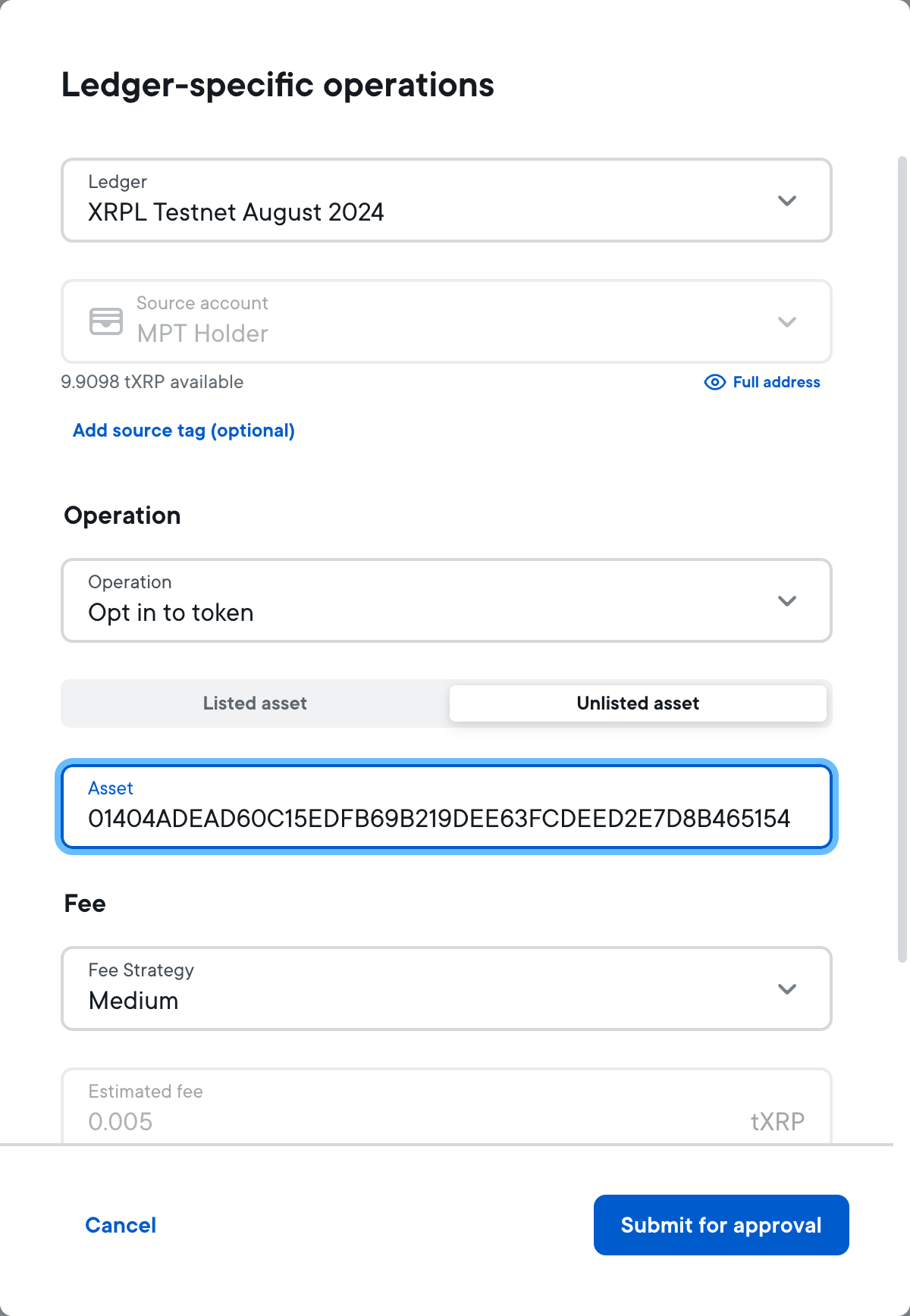
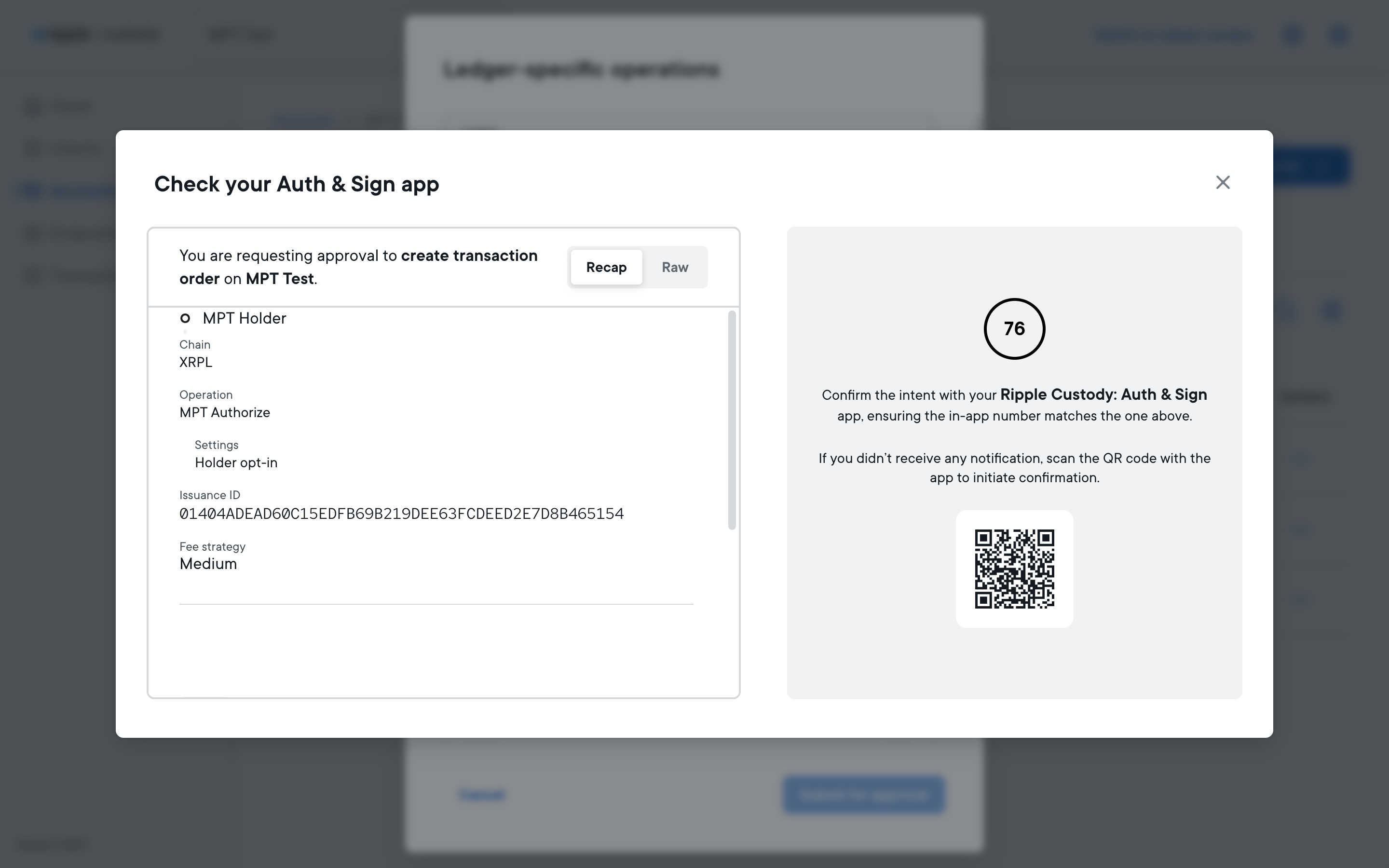
Select a Fee Strategy, then click Submit for approval and sign the operation with the app. The signing window shows the operation as MPT Authorize with the setting Holder opt-in.
If the MPT requires authorization, the issuer must also authorize your account before you can receive the token.
All new requests to change the system state follow the same process. To familiarize yourself with this process first, see Manage intents and approvals.
To authorize an MPT in Ripple Custody (Vault), create a transaction order with the MPTokenAuthorize operation:
{
  "payload": {
    "id": "{{intent_id}}",
    "accountId": "42e44ded-a268-4426-a0fe-7287b5d52a01",
    "ledgerId": "xrpl-testnet",
    "parameters": {
      "type": "XRPL",
      "feeStrategy": {
        "priority": "Medium",
        "type": "Priority"
      },
      "memos": [],
      "operation": {
        "type": "MPTokenAuthorize",
        "tokenIdentifier": {
          "issuanceId": "000004C463C52827307480341125DA0577AFFC21D4B2D083",
          "type": "MPTokenIssuanceId"
        },
        "flags": []
      }
    },
    "customProperties": {},
    "type": "v0_CreateTransactionOrder"
  }
}| Field | Type | Description |
|---|---|---|
operation.type | string | Must be MPTokenAuthorize. |
operation.tokenIdentifier.type | string | MPTokenIssuanceId to identify the MPT by its issuance ID, or TickerId to identify it by its ticker ID. |
operation.tokenIdentifier.issuanceId | string | The 192-bit MPT issuance ID (48 hex characters). Required when type is MPTokenIssuanceId. |
operation.tokenIdentifier.tickerId | string | The ID of the MPT's ticker. Required when type is TickerId. |
operation.flags | array | Empty array [] for authorization. |
To revoke authorization and remove the MPToken entry, include the tfMPTUnauthorize flag:
{
  "operation": {
    "type": "MPTokenAuthorize",
    "tokenIdentifier": {
      "issuanceId": "000004C463C52827307480341125DA0577AFFC21D4B2D083",
      "type": "MPTokenIssuanceId"
    },
    "flags": ["tfMPTUnauthorize"]
  }
}
You can only revoke authorization if your MPT balance is zero. Transfer or return all tokens before revoking.