If your Ripple account has access to more than one organization, you can move between them without signing out and signing back in. The organization switcher at the top of the navigation menu lets you change which organization you're working in during a single session.
When you switch organizations, Ripple Payments loads the data and permissions for the selected organization. What you can see and do may differ from one organization to another.
If your account has access to only one organization, the switcher displays your organization name but does not open a list.
Save any unsaved work in your current organization. Switching organizations reloads the interface, and unsaved changes are not carried over.
At the top of the navigation menu, select your current organization's name. This displays a dropdown menu of available organizations.
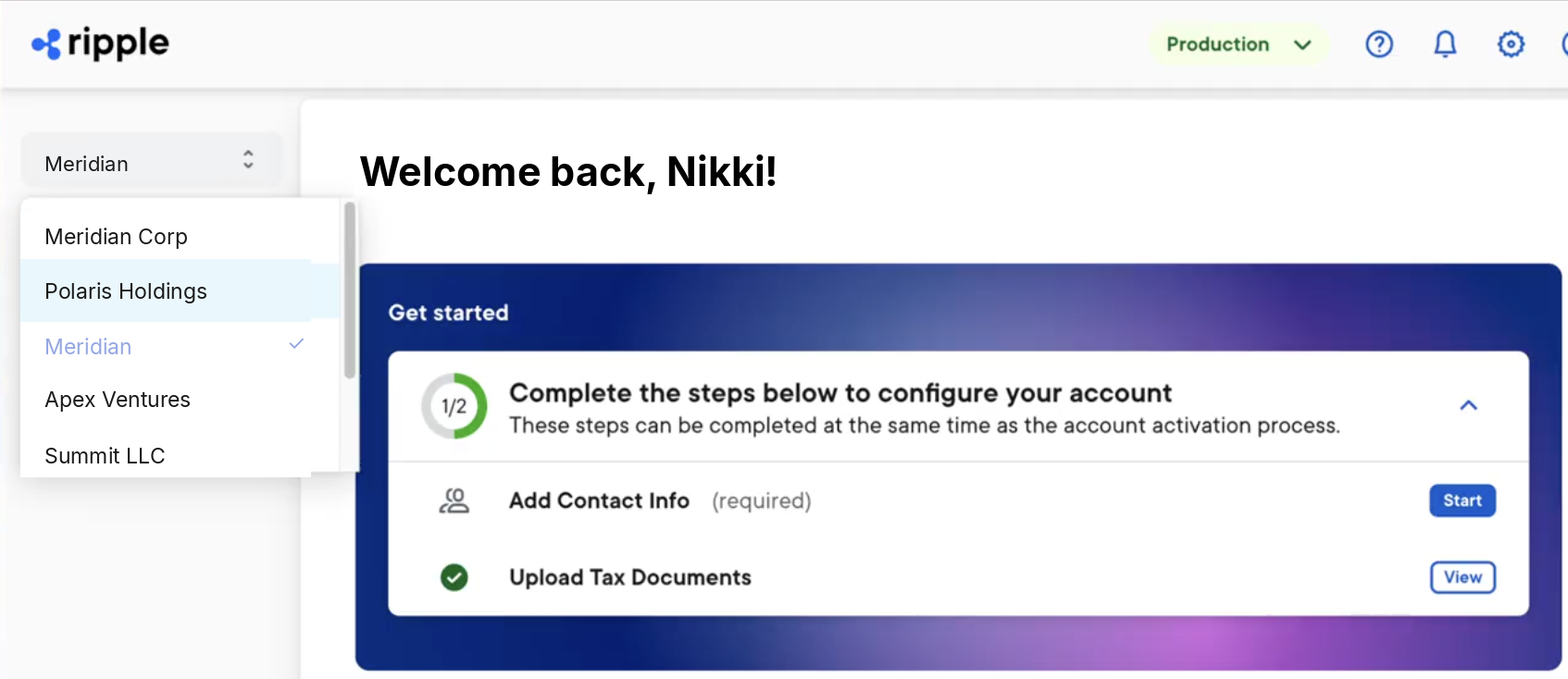
In the list of organizations, select the organization you want to open. A checkmark indicates your current organization.
While the switch completes, a Loading message appears. When it finishes, this takes you to the Home page for the selected organization.
If you are unable to switch to an organization, a message explains why. Each message includes a Back button that returns you to your current organization.
| Message | What it means | What to do |
|---|---|---|
| You no longer have access to [Organization Name]. Your access has expired or been revoked. | Your access to that organization was removed. | Contact your organization administrator, or select Contact support if you believe this is a mistake. |
| You don't have access to [Organization Name]. Your access may have been revoked, or the organization is no longer active. | Your access was removed, or the organization is no longer active. | Select Contact support if you believe this is a mistake. |
| The [Organization Name] account has been deactivated. | The organization's account is no longer active. | Select Contact support for more information. |
| You don't have access to [Organization Name] yet. | Your account isn't set up with permissions for that organization yet. | Contact your organization administrator to get set up, or select Contact support if you still need help. |
| Your session has expired. | Your session is no longer valid. | Select Sign in to sign in again and continue where you left off. |