This page is the canonical reference for policy fields, JavaScript conditions, workflow objects, and policy-writing rules. For the concept, see Policies. For operations, see Manage policies. For reusable patterns, see Policy examples.
| Task | API reference |
|---|---|
| Create, update, lock, or unlock a policy | Propose an intent |
| Test a policy intent | Perform a dry run |
| Query policies | List policies, Get policy details |
| Check the full schema | OpenAPI specification |
These fields are used in a v0_CreatePolicy payload and in genesis policy entries. Genesis policy entries are embedded in a domain's policies array and do not include the type field.
| Field | Type | Required | Rules |
|---|---|---|---|
id | UUID string | Yes | Unique policy ID. |
alias | string | Yes | 1-75 characters. Use a stable operational name. |
rank | integer | Yes | 0-1000. Higher rank wins among matching policies. |
intentTypes | string array | No | If omitted, the policy can match all intent types. Use only for deliberate fallback or emergency policies. |
intentOrigin | enum | No | UserSigned or SystemSigned. If omitted, the policy matches user-signed proposals only. |
scope | enum | Yes | Self, Descendants, or SelfAndDescendants. |
scriptingEngine | enum | Yes | Javascript_v0. |
condition | object | No | If omitted, the condition behaves as always true. |
workflow | array | No | If omitted or null, matching intents are auto-approved. An empty array rejects matching intents. |
lock | enum | Yes | Unlocked or Locked. |
description | string | No | 0-250 characters. |
customProperties | object | Yes | String key-value metadata. Use {} when empty. |
type | string | Yes for intent payloads | v0_CreatePolicy. Omit inside genesis policy entries. |
v0_UpdatePolicy uses a reference instead of id so the update targets a specific policy revision.
{
  "payload": {
    "reference": {
      "id": "5b440ba5-d013-11eb-8cd0-dcfb48cfb3cb",
      "revision": 3
    },
    "alias": "policy-governance",
    "rank": 750,
    "intentTypes": ["v0_CreatePolicy", "v0_UpdatePolicy"],
    "intentOrigin": "UserSigned",
    "scope": "Self",
    "scriptingEngine": "Javascript_v0",
    "condition": {
      "expression": "context.references.users[context.request.author.id].roles.includes('policy-operator')",
      "type": "Expression"
    },
    "workflow": [
      {
        "role": "policy-operator",
        "quorum": 2,
        "type": "RoleQuorum"
      }
    ],
    "description": "Controls policy lifecycle operations.",
    "customProperties": {},
    "type": "v0_UpdatePolicy"
  }
}
v0_LockPolicy and v0_UnlockPolicy use only reference and type.
{
  "payload": {
    "reference": {
      "id": "5b440ba5-d013-11eb-8cd0-dcfb48cfb3cb",
      "revision": 3
    },
    "type": "v0_LockPolicy"
  }
}When an intent is submitted, policy evaluation:
- Finds policies in the target domain and any applicable parent or child domains.
- Filters by
intentTypes. A policy with omittedintentTypescan match any intent type. - Filters by
scopeand domain governing strategy. - Filters by
intentOrigin. A policy with omittedintentOriginmatches user-signed proposals only. - Evaluates
condition. A condition must returntruefor the policy to remain eligible. - Selects the highest-ranked eligible policy.
- If two eligible policies have the same rank, the older policy wins.
- Applies the selected policy's workflow.
If no policy matches, the intent cannot execute.
| Value | Applies to |
|---|---|
Self | Intents targeting the policy's own domain. |
Descendants | Intents targeting descendant domains only. |
SelfAndDescendants | Intents targeting the policy's own domain and descendant domains. |
Domain governing strategy changes how parent and child policies interact:
| Governing strategy | Policy effect |
|---|---|
ConsiderDescendants | Parent and child policies can both be considered. Highest-rank eligible policy wins. |
CoerceDescendants | Matching parent policies override matching child policies. |
intentOrigin controls whether a policy matches a normal user-signed proposal or an API-only system-signed proposal.
| Value | Applies to |
|---|---|
| Omitted | User-signed proposals. |
UserSigned | User-signed proposals. |
SystemSigned | System-signed proposals submitted through the API. |
Existing policies that omit intentOrigin do not match system-signed proposals. To allow a service caller to submit an intent without a client-side payload signature, create or update a policy with intentOrigin: "SystemSigned".
| Range | Typical use |
|---|---|
| 900-1000 | Explicit emergency or breakglass controls with narrow intent types and high quorum. |
| 500-800 | High-risk governance such as policy, domain, user, and root administration. |
| 100-500 | Standard operational policies. |
| 1-99 | Catch-all or fallback policies that should lose to specific policies. |
| 0 | Last-resort behavior or intentionally lowest priority. |
A condition is either an Expression, an And, or an Or.
{
  "condition": {
    "expression": "context.references.users[context.request.author.id].roles.includes('transaction-operator')",
    "type": "Expression"
  }
}
And and Or use a binary tree. Use left and right, not arrays.
{
  "condition": {
    "left": {
      "expression": "context.request.payload.rank >= 700",
      "type": "Expression"
    },
    "right": {
      "expression": "context.references.users[context.request.author.id].roles.includes('policy-operator')",
      "type": "Expression"
    },
    "type": "And"
  }
}
You can also use JavaScript logical operators inside one expression when that is clearer.
{
  "condition": {
    "expression": "context.request.payload.rank >= 700 && context.references.users[context.request.author.id].roles.includes('policy-operator')",
    "type": "Expression"
  }
}
Condition expressions can use the context object. System-signed policy conditions can also use context.submitter and intentOrigin.
| Object | Contains |
|---|---|
context.request | The intent being evaluated. |
context.references | Entities explicitly referenced by the intent. You cannot query arbitrary entities from a policy condition. |
context.submitter | Identity of the user or service caller that submitted the proposal. |
intentOrigin | Proposal origin, either UserSigned or SystemSigned. |
Common context.request paths:
| Path | Contains |
|---|---|
context.request.author.id | User ID that created the intent. |
context.request.author.domainId | Author's domain ID. |
context.request.targetDomainId | Domain targeted by the intent. |
context.request.payload | Intent-specific payload. |
context.request.payload.type | Intent type, such as v0_CreatePolicy. |
context.request.payload.customProperties | Custom metadata supplied in the payload, when present. |
For system-signed proposals, context.request.author is not present. Use context.submitter to check the service caller instead.
Submitter paths:
| Path | Contains |
|---|---|
context.submitter.type | User or Service. |
context.submitter.reference.id | User ID for user-signed proposals. |
context.submitter.reference.domainId | User domain ID for user-signed proposals. |
context.submitter.subject | Service subject for system-signed proposals. |
context.submitter.custodyRoles | Roles from the service caller token for system-signed proposals. If the configured roles claim is absent, this is an empty array. |
System-signed condition example:
{
  "condition": {
    "expression": "context.submitter.type === 'Service' && context.submitter.custodyRoles.includes('gas-station-service')",
    "type": "Expression"
  }
}
Useful payload paths by intent type:
| Intent type | Useful paths |
|---|---|
v0_CreateUser | context.request.payload.roles, context.request.payload.alias, context.request.payload.loginIds |
v0_UpdateUser | context.request.payload.reference.id, context.request.payload.roles, context.request.payload.loginIds |
v0_CreatePolicy | context.request.payload.rank, context.request.payload.intentTypes, context.request.payload.scope, context.request.payload.workflow |
v0_UpdatePolicy | context.request.payload.reference.id, context.request.payload.rank, context.request.payload.intentTypes, context.request.payload.scope, context.request.payload.workflow |
v0_CreateDomain | context.request.payload.alias, context.request.payload.governingStrategy, context.request.payload.permissions, context.request.payload.childrenDomainIds |
v0_UpdateDomainPermissions | context.request.payload.reference.id, context.request.payload.permissions.readAccess |
v0_CreateTransactionOrder | context.request.payload.accountId, context.request.payload.ledgerId, context.request.payload.parameters |
v0_ReleaseQuarantinedTransfers | Payload fields for the quarantine release request. Use existence checks before accessing optional fields. |
Common context.references collections:
| Collection | Access pattern | Use when |
|---|---|---|
| Users | context.references.users[userId] | Check the author's current roles or target user state. |
| Accounts | context.references.accounts[accountId] | Check ledger, account metadata, or account custom properties. |
| Endpoints | context.references.endpoints[endpointId] | Check endpoint trust score or endpoint metadata. |
| Vaults | context.references.vaults[vaultId] | Check vault properties for account or vault operations. |
| Tickers | context.references.tickers[tickerId] | Check ticker or asset metadata when referenced. |
| Domains | context.references.domains[domainId] | Check domain metadata when referenced. |
The following diagram shows how a condition can navigate from an intent payload to a referenced account's custom properties:
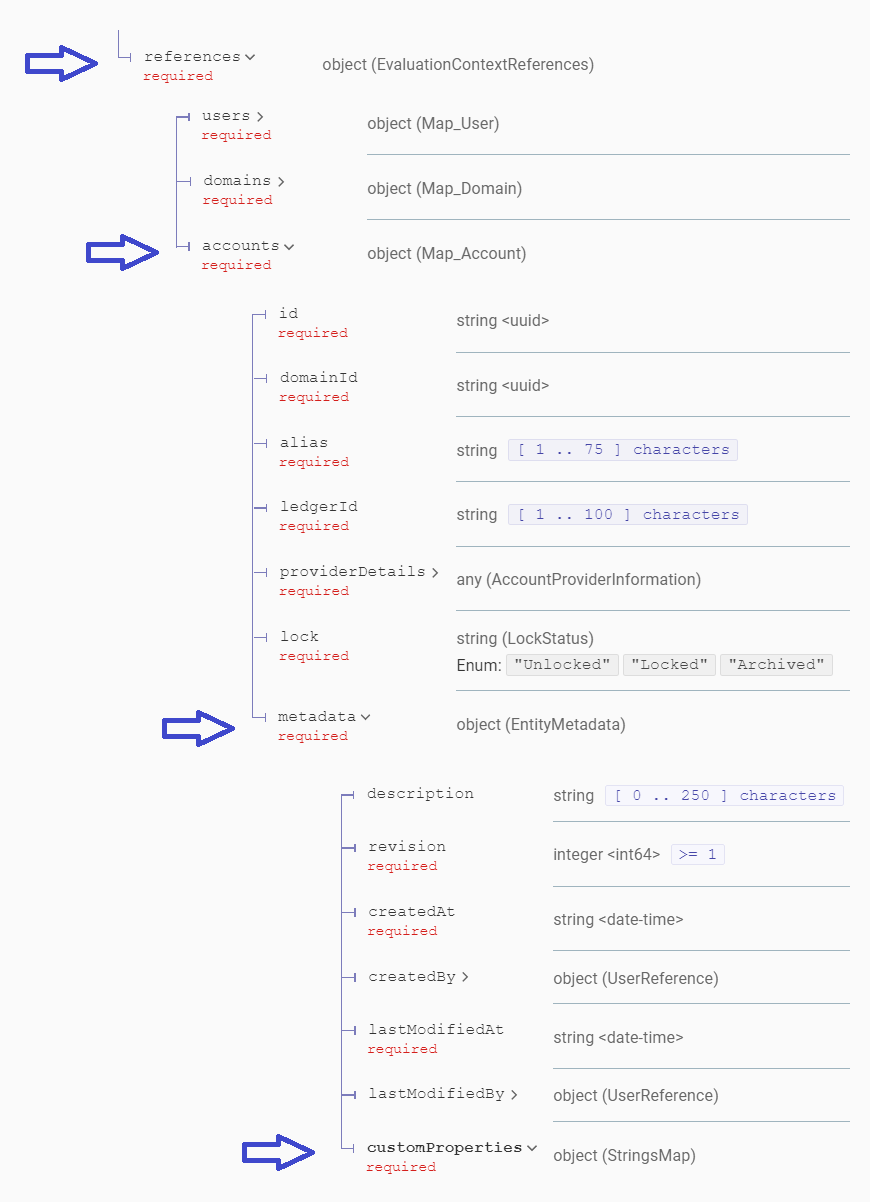
Conditions are JavaScript expressions. Write one expression that evaluates to true or false.
| Rule | Guidance |
|---|---|
Use Javascript_v0 | This is the supported scripting engine. |
| Return a boolean | The expression should evaluate to true or false for every matching intent. |
| Prefer strict paths | Check the actual payload shape for each intent type in the API reference before writing paths. |
| Check optional fields | Use hasOwnProperty, null checks, or array length checks before accessing optional nested fields. |
| Use role names exactly | Role names are case-sensitive and must match user roles. |
| Keep expressions deterministic | Avoid relying on external state. Policies cannot call APIs or query arbitrary entities. |
Supported JavaScript patterns:
| Pattern | Example |
|---|---|
| Comparison | context.request.payload.rank >= 700 |
| Logical operators | a && b, `a |
| Array includes | roles.includes('compliance') |
| Array some/every/filter | outputs.some(output => BigInt(output.amount) > 100000000n) |
| Array reduce | outputs.reduce((sum, output) => sum + BigInt(output.amount), 0n) |
| String methods | alias.startsWith('prod-'), alias.includes('treasury') |
| Object checks | payload.hasOwnProperty('parameters') |
| JSON methods | JSON.parse(rawTx), JSON.stringify(roles) |
| Date methods | new Date().getHours(), new Date().getDay() |
Amount handling:
- Use BigInt for amount comparisons.
- Use an
nsuffix for integer literals, such as50000000000n. - When the payload value is a string, wrap it with
BigInt(...). - For multi-output payloads, sum amounts with
reduce.
{
  "condition": {
    "expression": "context.request.payload.parameters.outputs.reduce((sum, output) => sum + BigInt(output.amount), 0n) >= 500000000n",
    "type": "Expression"
  }
}
Null-safe nested access:
{
  "condition": {
    "expression": "context.request.payload.hasOwnProperty('parameters') && context.request.payload.parameters != null && context.request.payload.parameters.hasOwnProperty('destination') && context.request.payload.parameters.destination.type == 'Endpoint'",
    "type": "Expression"
  }
}This condition matches when the author is an operator, the transaction parameters are Bitcoin, and either the amount is at least 1 BTC or the source account has a custom property named escalatePolicy set to true.
{
  "expression": "context.references.users[context.request.author.id].roles.includes('operator') && context.request.payload.hasOwnProperty('parameters') && context.request.payload.parameters != null && context.request.payload.parameters.type == 'Bitcoin' && (context.request.payload.parameters.outputs.reduce((sum, output) => sum + BigInt(output.amount), 0n) >= 100000000n || context.references.accounts[context.request.payload.accountId].metadata.customProperties.escalatePolicy == 'true')",
  "type": "Expression"
}This condition matches operator-created Bitcoin transactions below 1 BTC where the account is not escalated and the destination is either an unknown address or an endpoint with a trust score of 50 or lower.
{
  "left": {
    "expression": "context.references.users[context.request.author.id].roles.includes('operator') && context.request.payload.hasOwnProperty('parameters') && context.request.payload.parameters != null && context.request.payload.parameters.type == 'Bitcoin' && context.request.payload.parameters.outputs.reduce((sum, output) => sum + BigInt(output.amount), 0n) <= 100000000n && context.references.accounts[context.request.payload.accountId].metadata.customProperties.escalatePolicy != 'true' && context.request.payload.parameters.outputs[0].destination.type == 'Address'",
    "type": "Expression"
  },
  "right": {
    "expression": "context.references.users[context.request.author.id].roles.includes('operator') && context.request.payload.hasOwnProperty('parameters') && context.request.payload.parameters != null && context.request.payload.parameters.type == 'Bitcoin' && context.request.payload.parameters.outputs.reduce((sum, output) => sum + BigInt(output.amount), 0n) <= 100000000n && context.references.accounts[context.request.payload.accountId].metadata.customProperties.escalatePolicy != 'true' && context.request.payload.parameters.outputs[0].destination.type == 'Endpoint' && context.references.endpoints[context.request.payload.parameters.outputs[0].destination.endpointId].trustScore <= 50",
    "type": "Expression"
  },
  "type": "Or"
}This condition matches operator-created Bitcoin transactions below 1 BTC where the account is not escalated and the destination is either an internal account or an endpoint with a trust score of 50 or higher.
{
  "left": {
    "expression": "context.references.users[context.request.author.id].roles.includes('operator') && context.request.payload.hasOwnProperty('parameters') && context.request.payload.parameters != null && context.request.payload.parameters.type == 'Bitcoin' && context.request.payload.parameters.outputs.reduce((sum, output) => sum + BigInt(output.amount), 0n) <= 100000000n && context.references.accounts[context.request.payload.accountId].metadata.customProperties.escalatePolicy != 'true' && context.request.payload.parameters.outputs[0].destination.type == 'Account'",
    "type": "Expression"
  },
  "right": {
    "expression": "context.references.users[context.request.author.id].roles.includes('operator') && context.request.payload.hasOwnProperty('parameters') && context.request.payload.parameters != null && context.request.payload.parameters.type == 'Bitcoin' && context.request.payload.parameters.outputs.reduce((sum, output) => sum + BigInt(output.amount), 0n) <= 100000000n && context.references.accounts[context.request.payload.accountId].metadata.customProperties.escalatePolicy != 'true' && context.request.payload.parameters.outputs[0].destination.type == 'Endpoint' && context.references.endpoints[context.request.payload.parameters.outputs[0].destination.endpointId].trustScore >= 50",
    "type": "Expression"
  },
  "type": "Or"
}This condition matches user creation or update intents when the target user has the admin or compliance role.
{
  "expression": "context.request.payload.roles.includes('admin') || context.request.payload.roles.includes('compliance')",
  "type": "Expression"
}
This condition matches user creation or update intents when the target user does not have either privileged role.
{
  "expression": "!context.request.payload.roles.includes('admin') && !context.request.payload.roles.includes('compliance')",
  "type": "Expression"
}
Avoid these patterns:
| Avoid | Reason |
|---|---|
fetch, imports, network calls, or database calls | Conditions cannot call external systems. |
| DOM, browser APIs, timers, or process APIs | Policy evaluation is server-side. |
| Statements that require a block | The field expects an expression. Prefer array methods and logical operators. |
| Missing optional-field checks | Undefined nested paths can make condition evaluation fail. |
| Comparing large amounts as normal numbers | JavaScript numbers can lose precision. |
A workflow is an ordered array of approval steps. Each step must be satisfied before the next step is active.
| Type | Shape | Use when |
|---|---|---|
RoleQuorum | { "role": "operator", "quorum": 2, "type": "RoleQuorum" } | A number of users with one role must approve. |
And | { "left": {...}, "right": {...}, "type": "And" } | Multiple approval groups are required in the same step. |
Or | { "left": {...}, "right": {...}, "type": "Or" } | Either approval group can satisfy the step. |
Example workflow:
{
  "workflow": [
    {
      "role": "transaction-operator",
      "quorum": 1,
      "type": "RoleQuorum"
    },
    {
      "left": {
        "role": "compliance",
        "quorum": 1,
        "type": "RoleQuorum"
      },
      "right": {
        "role": "risk",
        "quorum": 1,
        "type": "RoleQuorum"
      },
      "type": "And"
    }
  ]
}
Workflow rules:
- For user-signed proposals, the intent submitter counts as the first approval.
- For user-signed proposals, the submitter must have a role compatible with the first workflow step.
- For system-signed proposals, the service submitter does not count as a user approval. If a system-signed policy includes a workflow, user-signed approvers must satisfy it.
- If quorum is not reached, the step remains open and users can change their decision. Once a step is executed, it cannot be changed.
- A user can count only once in the complete approval workflow.
- Duplicate approvals are checked at public-key level.
- If a user has roles on both sides of an
AndorOr, the engine uses one approval on the quickest valid path. RoleQuorum.quorummust be at least1.AndandOruseleftandright, not arrays.- An omitted or
nullworkflow auto-approves a matching intent. - An empty workflow array rejects a matching intent.
Step 1 is satisfied by the submitter with the operator role. Step 2 is satisfied by one supervisor or one supervisor-bot.
[
  {
    "role": "operator",
    "quorum": 1,
    "type": "RoleQuorum"
  },
  {
    "left": {
      "role": "supervisor",
      "quorum": 1,
      "type": "RoleQuorum"
    },
    "right": {
      "role": "supervisor-bot",
      "quorum": 1,
      "type": "RoleQuorum"
    },
    "type": "Or"
  }
]Step 1 is satisfied by the submitter with the operator role. Step 2 requires compliance or compliance-bot approval and risk or risk-bot approval. Step 3 requires one ciso approval.
[
  {
    "role": "operator",
    "quorum": 1,
    "type": "RoleQuorum"
  },
  {
    "left": {
      "left": {
        "role": "compliance",
        "quorum": 1,
        "type": "RoleQuorum"
      },
      "right": {
        "role": "compliance-bot",
        "quorum": 1,
        "type": "RoleQuorum"
      },
      "type": "Or"
    },
    "right": {
      "left": {
        "role": "risk",
        "quorum": 1,
        "type": "RoleQuorum"
      },
      "right": {
        "role": "risk-bot",
        "quorum": 1,
        "type": "RoleQuorum"
      },
      "type": "Or"
    },
    "type": "And"
  },
  {
    "role": "ciso",
    "quorum": 1,
    "type": "RoleQuorum"
  }
]
Role names used in users, read access, conditions, and workflows must match exactly.
| Valid | Avoid |
|---|---|
policy-operator | PolicyOperator |
transaction-operator | transaction_operator |
compliance | Compliance Team |
platform-admin | platform admin |
The API schema accepts role names that match [a-z0-9\-]+.
{
  "id": "c35fa005-1640-42ee-a8a5-c43aaae6eb87",
  "alias": "operator-approval",
  "rank": 100,
  "scope": "Self",
  "intentTypes": ["v0_CreateTransactionOrder"],
  "scriptingEngine": "Javascript_v0",
  "condition": {
    "expression": "context.references.users[context.request.author.id].roles.includes('transaction-operator')",
    "type": "Expression"
  },
  "workflow": [
    {
      "role": "transaction-operator",
      "quorum": 2,
      "type": "RoleQuorum"
    }
  ],
  "lock": "Unlocked",
  "description": "Requires transaction operator quorum.",
  "customProperties": {},
  "type": "v0_CreatePolicy"
}| Mistake | Result | Fix |
|---|---|---|
Empty workflow: [] | Matching intents are rejected. | Omit workflow or use null for auto-approval, or define approval steps. |
Omitted intentTypes on a high-rank policy | Policy can match unexpectedly broad workflows. | Specify intent types unless the policy is a deliberate fallback. |
customProperties: null | Payload validation can fail. | Use {} when empty. |
| Role names with uppercase, underscores, spaces, or padding | Workflows cannot be satisfied by expected roles. | Use lowercase hyphenated role names, such as policy-operator. |
And or Or written as arrays | Payload validation fails. | Use left, right, and type. |
| Amount compared as a JavaScript number | Precision loss or mismatched comparisons. | Use BigInt(...) and n literals. |
| Missing optional-field checks | Condition can fail for intent types with different payload shapes. | Check existence before accessing nested fields. |
| Required quorum has too few users | Intent cannot be approved. | Create enough users before deploying the policy. |
| First workflow step excludes maker role for a user-signed policy | Intent fails at submission or cannot progress. | Include the maker role in the first workflow step. For system-signed policies, make sure user approvers can satisfy the workflow. |
For implementation patterns, see Policy examples.