You might need to rotate the wrapping key in IBM HSM on s390x architecture for several reasons:
- To satisfy compliance and regulatory requirements, such as the Digital Operational Resilience Act (DORA).
- To comply with cybersecurity policies within your institution.
For vaults, rotating the IBM HSM wrapping key means rewrapping the previously wrapped seed with the new master key. This document refers to this process as vault key rotation.
You can rotate the HSM wrapping key only for vaults that do not have random accounts generated with the vault.
This page describes the vault key rotation process, which involves the following steps:
Do a dry run of the vault wrapping key rotation intent to confirm that the vault hasn't generated random accounts, so that rotation can proceed.
If Step 1 fails, see Troubleshooting.
If Step 1 succeeds, load and commit the new master key into the HSM so that the new master key is in the
Full committedstate while the old master key remains in theValidstate. For example: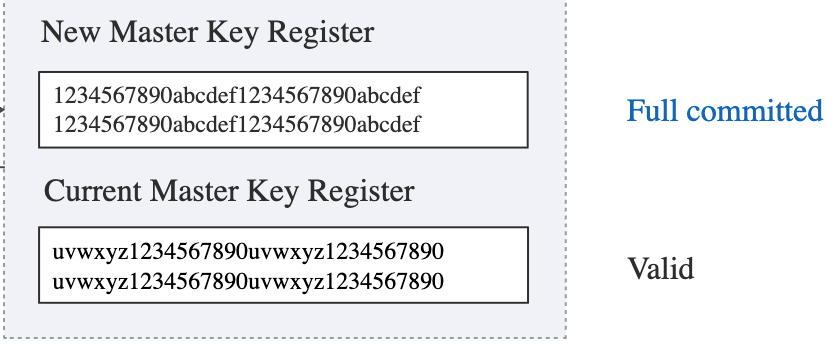
Trigger the intent to start vault wrapping key rotation.
Wait for the
VaultKeyMaterialRewrapCompletedorVaultKeyMaterialRewrapFailedevent.Activate the new master key in the IBM HSM.
The details are as follows:
The links in this section refer to IBM Hyper Protect Crypto Service. For an on-premises HSM, contact IBM for the correct procedure.
Before beginning, make sure that you know which of the four IBM key rotation methods you are using, based on the Service Plan — the Standard Plan or the Unified Key Orchestrator Plan — that you are using.
For a description of the master key rotation strategies under the two plans, see:
For the instructions for the key rotation procedures, see:
- Rotating master keys by using smart cards and the Management Utilities
- Rotating master keys by using recovery crypto units
- Rotating master keys by using key part files
- Recovering a master key from a recovery crypto unit
Although performed rarely, key rotation involves some downtime for normal operations. For this reason, we recommend performing key rotation outside of usual business hours.
Suspend any business operations during the key rotation process. If you submit an intent that the vault needs to sign, this intent will be stuck in retrial indefinitely.
First, do a dry run of the intent that executes the key rotation. The dry run confirms that the vault hasn't generated random accounts, so that rotation can proceed.
To do the dry run:
- In the Custody API, call the Perform a dry run for a given intent payload operation with the following
v0_RewrapVaultKeyMaterialintent payload. For more information about dry runs, see Dry run intents.
{
  "type": "v0_RewrapVaultKeyMaterial",
  "vaultId": "insert-vault-uuid-here",
  "customProperties": {}
}
Provide the
vaultIdof the vault whose key you're rotating.Approve and sign the intent.
If the dry run succeeds, proceed to Step 2.
If the dry run fails, see Troubleshooting.
Follow the procedure you are using — based on your IBM HSM deployment — for loading and committing the master key in the IBM HSM.
Before you proceed to Step 3, verify that the New Master Key Register contains the new master key and is in the Full committed state, and that the Current Master Key Register contains the old master key and is in the Valid state. For example:
Next, execute the intent to complete the vault key rotation.
To execute the intent:
- In the Custody API, call the Propose an intent operation with the following
v0_RewrapVaultKeyMaterialintent payload. For more information about requesting intents, see Manage intents and approvals.
{
  "type": "v0_RewrapVaultKeyMaterial",
  "vaultId": "insert-vault-uuid-here",
  "customProperties": {}
}
Provide the
vaultIdof the vault whose key you're rotating.Approve and sign the intent.
During vault key rotation, Ripple Custody asks the HSM to rewrap the seed and the vault signing key with the key in the New Master Key Register.
Ripple Custody lazy rotates account keys — the next time you use a key to sign, Ripple Custody checks lastKeyMaterialRewrappingDate and determines whether it has already updated the key material with the rewrapped seed.
After you approve the intent, wait for the intent state to change to Executed. If the operation succeeds, Ripple Custody emits a VaultKeyMaterialRewrapCompleted event. If it fails, Ripple Custody emits a VaultKeyMaterialRewrapFailed event.
If you see the VaultKeyMaterialRewrapCompleted event, proceed to Step 5.
If you see the VaultKeyMaterialRewrapFailed event, see Troubleshooting.
If no event appears within a minute or two, see Troubleshooting.
On the IBM HSM, complete the rotation to activate the new master key.
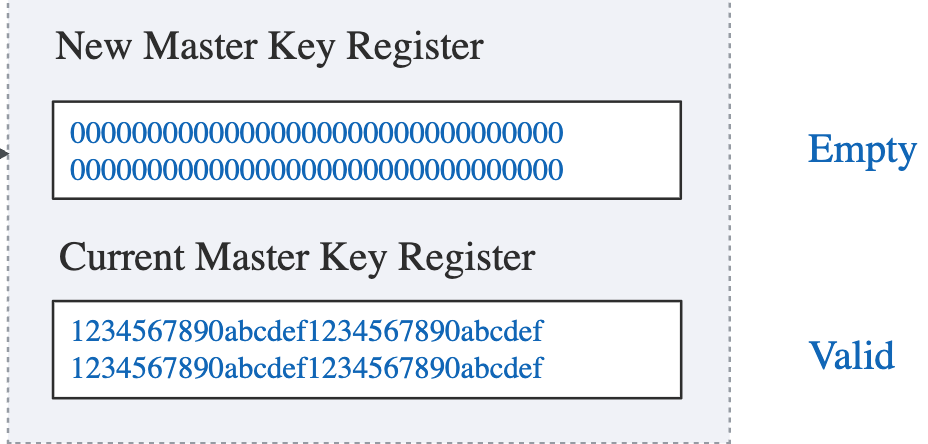
After the key rotation, verify that the New Master Key Register is in the Empty state, and that the Current Master Key Register contains the new master key and is in the Valid state. For example:
If you don't complete the IBM key rotation correctly, the vault can't sign transactions, and normal operations are interrupted.
If you haven't loaded the new master key, key rotation hasn't started. Continue to work with the old master key.
If the rewrapping intent fails with a VaultKeyMaterialRewrapFailed event, Ripple Custody is still using the old master key of the IBM HSM. Retry the intent until vault key rotation succeeds, which Ripple Custody signals with a VaultKeyMaterialRewrapCompleted event.
If the intent continues to fail, treat the HSM master key rotation as not completed, and continue to use the previous master key until you investigate the issue. The HSM must remain in the state shown in the following example. Ripple Custody continues to use the HSM in this state, and the existing vault continues to work as before.
If no event appears, the vault didn't receive the request. For a connected vault, check the connection between the vault and Ripple Custody. For a cold vault, perform the required manual operation. Also, make sure that the versions of the vault and KMS match the Ripple Custody version.
If the rewrapping intent succeeds (indicated by a VaultKeyMaterialRewrapCompleted event) but the final rotation step fails on the IBM HSM side, work with IBM to make sure that the HSM Master Key Register matches the example in Step 5.
Don't modify Ripple Custody, and don't submit any business intents, because they get stuck. Ripple Custody works only after you activate the new master key on the IBM side, as shown in Step 5.