Approval groups require designated users to review and approve actions before those actions take effect. Use the Approval groups tab of the Controls page in the console to create, update, and delete approval groups that enforce governance across transactions, addresses, policies, credentials, and users.
For what each approval type governs and how approvals work at runtime, see Approvals.
Only users with the Owner or Administrator role can create approval groups. Other roles don't see Create approval group. If you don't see it, ask an owner or administrator in your organization.
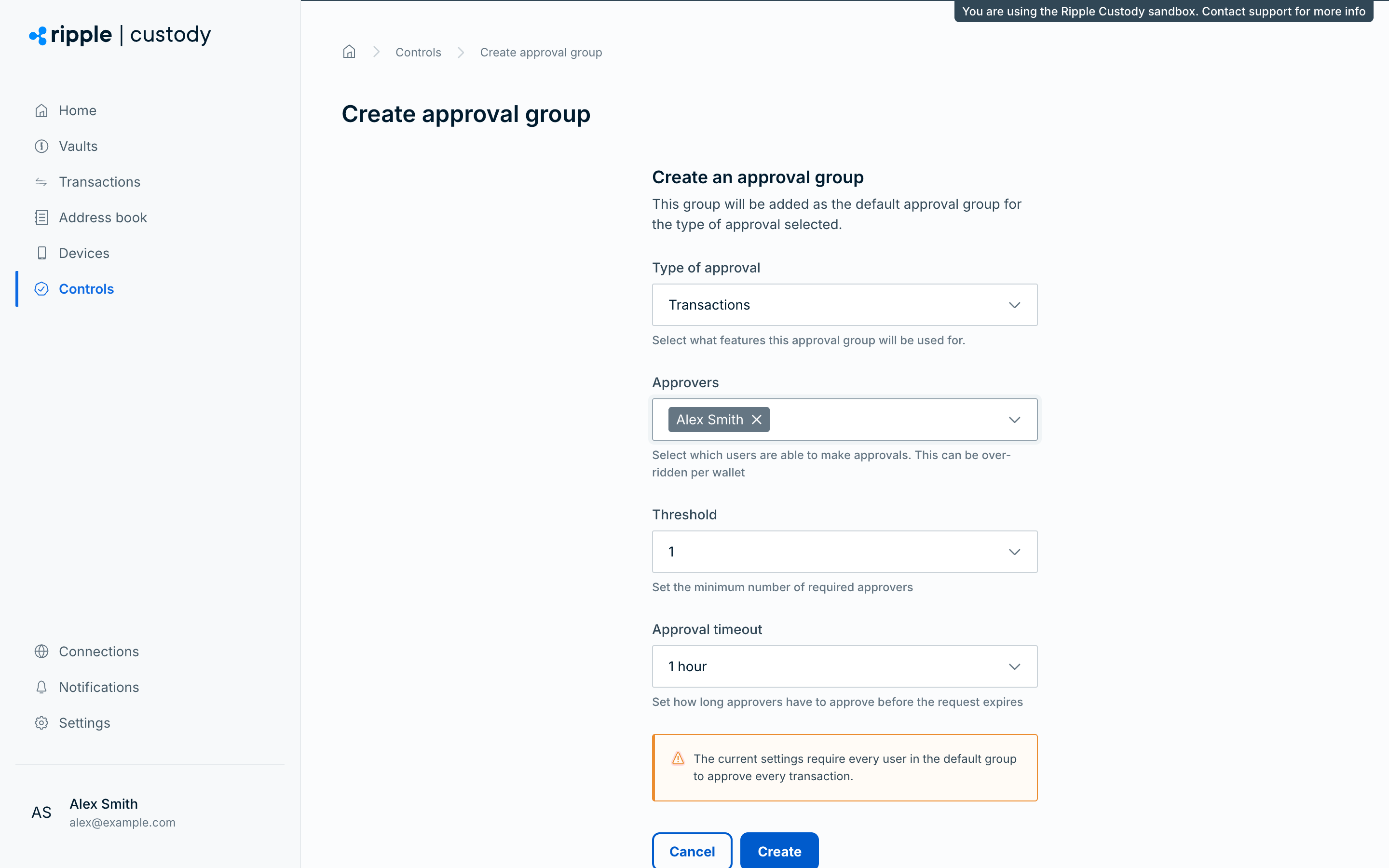
Go to the Controls section of the Ripple Custody (Wallet) console and select the Approval groups tab.
Select Create approval group.
Under Type of approval, select the entity that this approval group applies to. The list shows only types that don't have an approval group yet (to change an existing group, use Edit from the Actions menu of the table):
- Addresses
- API credentials
- Approval groups
- Policy rules
- Transactions
- Users
Under Approvers, select one or more users from your organization to become approvers.
- You can select any activated user, whatever their role, but only users with the Owner, Administrator, Proposer, or Approver role can approve. A Viewer, Auditor, or Support user in an approval group can never vote, which can make the group's threshold unreachable. Users who haven't activated their account aren't listed.
- You can select any number of approvers.
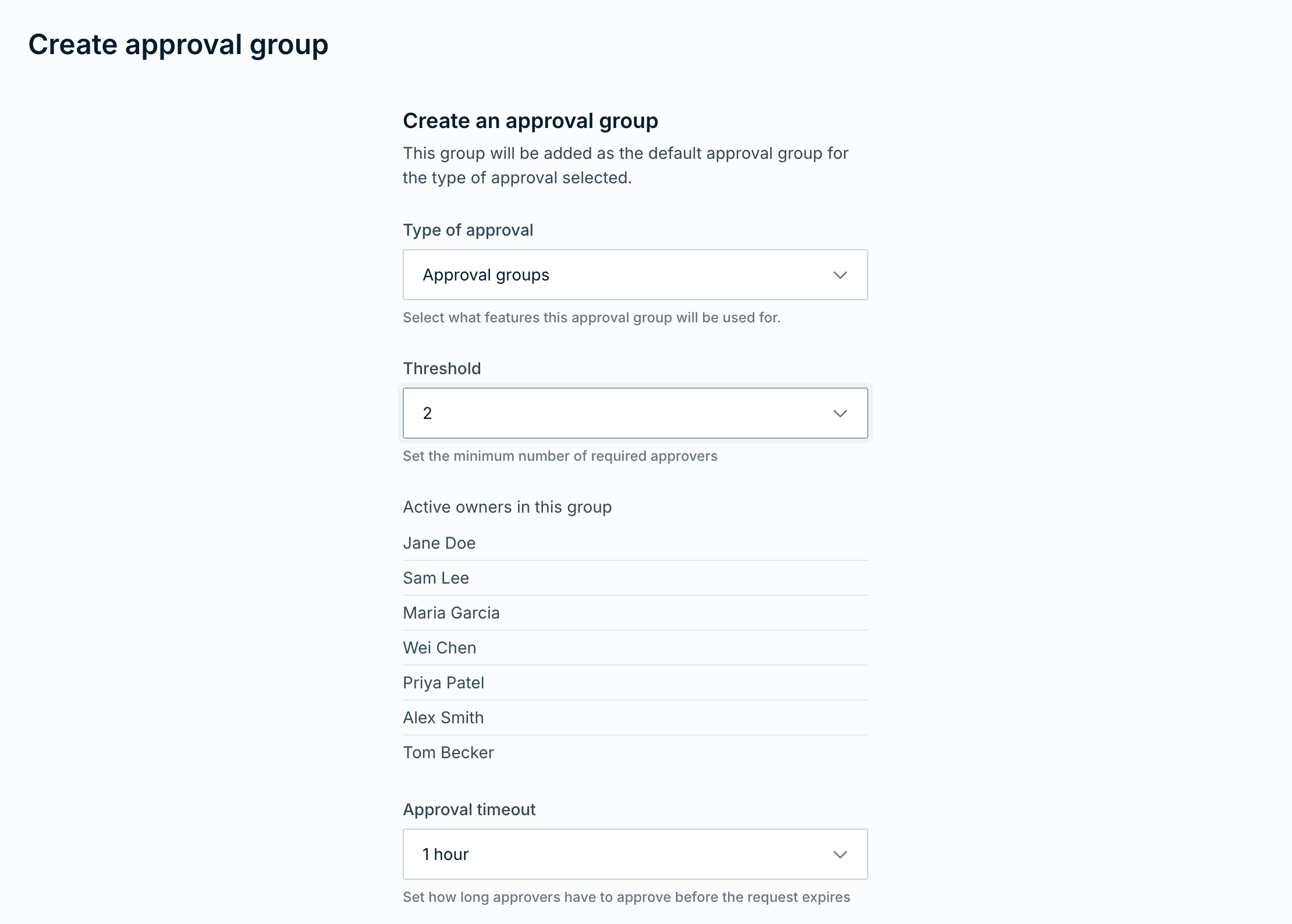
- For Approval groups, Ripple Custody (Wallet) uses active organization owners as approvers. You configure the threshold and timeout, but you don't select individual approvers.
Under Threshold, set the minimum number of required approvers per request. Threshold appears after you select approvers.
- You can require every user in the approval group, but we recommend majority approval to account for user availability.
- Example: If an approval group has three approvers, set the number of required approvers to two.
Under Approval timeout, set the time window approvers have to review and approve requests before they time out: 5, 15, or 30 minutes, or 1, 2, 4, 12, or 24 hours. The default is 1 hour.
The timeout applies to the approval requests that this group handles. The one exception is the Approval groups type: owners have the timeout set in the change itself, the requested timeout when you update a group and 1 hour when you delete one in the console. For changes to other approval groups, owners get the timeout of the group that the request changes. If approvers don't submit enough approvals within the configured timeout, Ripple Custody (Wallet) automatically rejects the approval.
Select Create. The console returns to the Approval groups tab and shows Approval group updated. If active owners must approve the change, it shows Approval group change pending instead.
Each entity type can have one default approval group.
Only users with the Owner or Administrator role can change a wallet's approval group. Other roles don't see Update approval group on the wallet's Approvers tab. If you don't see it, ask an owner or administrator in your organization.
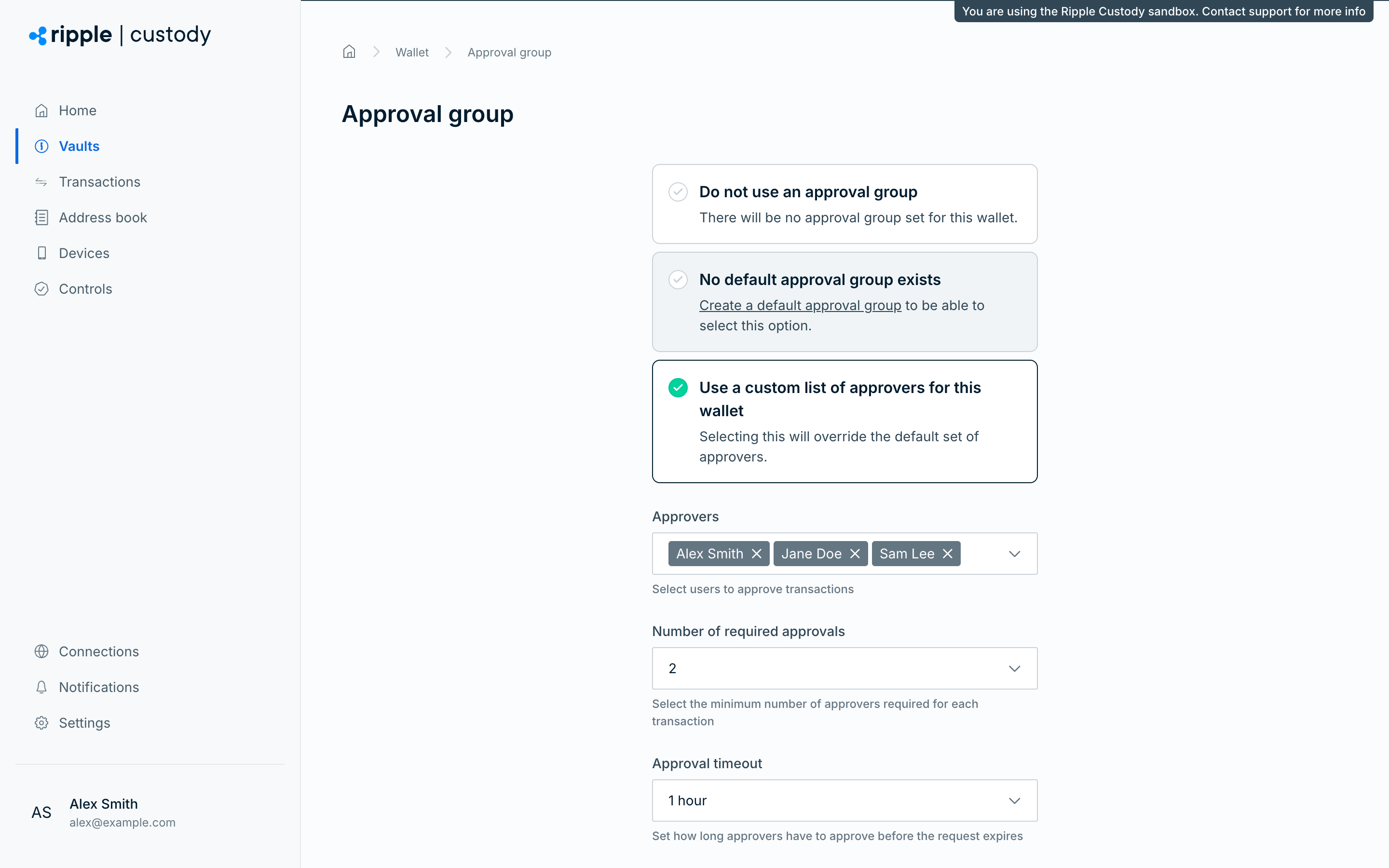
By default, transaction approval groups apply to all wallets. To override the default approval group for a wallet, go to the wallet's Approvers tab and select Update approval group. On the Approval group page, select one of these options:
- Do not use an approval group - No default approvals apply to transactions from this wallet. A transaction that triggers a step-up approval rule still needs that rule's approvers.
- Use default approval group - The wallet uses the organization-level transaction approval group.
- Use a custom list of approvers for this wallet - The wallet uses wallet-specific approvers and threshold settings. Select the Approvers, then the Number of required approvals, which appears after you select approvers, and the Approval timeout.
Then select Update approval group. If your organization has no transaction approval group, the console shows the default option as No default approval group exists and you can't select it. After you save, the console shows Approval group saved, or Approval group pending if active owners must approve the change.
To remove a wallet's custom approval group, open the Actions menu on its row on the Approvers tab and select Delete. The console shows Approval group deleted, or Approval group deletion pending if active owners must approve the deletion. If neither the wallet nor your organization has a transaction approval group, the tab shows No approval groups instead of a row. While a change to the wallet's approval group is pending approval, the console hides Update approval group and the row's Delete.
If your organization uses an Approval groups approval group, changes to wallet-level transaction approval group overrides require active owner approval before they take effect. A passkey wallet is the exception. Ripple Custody (Wallet) accepts only the wallet's creator as the single approver, with one required approval.
To require different approvers only for transactions of more than an amount, use step-up approvals.
Required role: Owner or Administrator.
Create an approval group with Approval groups as the approval type to require active owner approval before approval group changes take effect.
Create this approval group before you create or update other approval groups if you want active owners to approve those changes. The first Approval groups approval group turns on this requirement.
Ripple Custody (Wallet) sends approval group change requests only to active organization owners. Keep enough active owners available to meet the threshold before you turn on this requirement. If fewer owners are active than the threshold, Ripple Custody (Wallet) refuses approval group changes, including deleting the Approval groups approval group itself, with OwnerQuorumCannotBeMet instead of queuing it. You can set the threshold as high as the number of owner seats, including blocked or pending owners, so keep enough active owners before you raise the threshold or deactivate an owner. An owner who becomes blocked, or who loses the Owner role, after someone submits a change can't act on it: Ripple Custody (Wallet) refuses the approval with OwnerQuorumApproverInactive (PAL003.021).
To configure this requirement:
- Go to the Controls section of the Ripple Custody (Wallet) console and select the Approval groups tab.
- Select Create approval group.
- Under Type of approval, select Approval groups.
- Under Threshold, select the minimum number of active owners who must approve approval group changes.
- Under Approval timeout, select the timeout for this approval group. When you update this group, owners have the timeout set in the update. For changes to other approval groups, owners have the timeout set in the change: the group's timeout when you create it, and the requested timeout when you update it. When you delete a group in the console, including this one, owners have 1 hour.
- Select Create.
After you create this approval group, these changes create a pending approval request:
- Creating an organization-level approval group
- Updating an organization-level approval group
- Deleting an organization-level approval group
- Changing a wallet-level transaction approval group override, including switching a wallet to the default approval group, no approval group, or a custom list of transaction approvers
Ripple Custody (Wallet) applies the requested change only after enough active owners approve it. If you're an owner, you're one of the active owners who can approve, so you can approve a change that you submitted. If you update or delete the Approval groups approval group itself later, active owners must approve that change too.
While an approval group change is pending:
- Ripple Custody (Wallet) keeps the current approval group configuration in effect.
- The approval groups table shows Pending creation, Pending update, or Pending deletion status. Deleting the Approval groups approval group itself shows as Pending update, not Pending deletion.
- In the console, you can't edit or delete the approval group until the pending request completes, expires, or approvers reject it.
If enough owners reject the request that it can no longer reach the threshold, or the request expires, Ripple Custody (Wallet) leaves the existing approval group configuration unchanged. One rejection doesn't end the request while the remaining pending approvals can still reach the threshold.
Required role: Owner or Administrator.
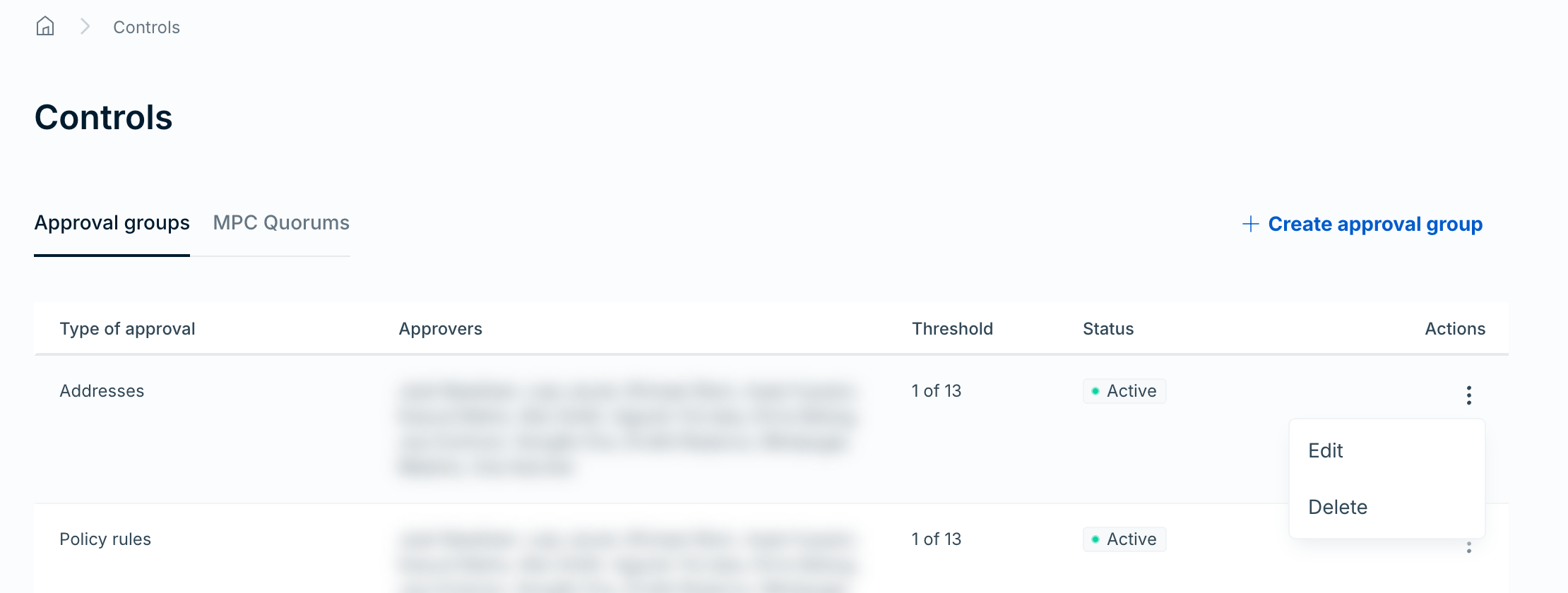
The Approval groups tab lists approval groups in a table. The Actions menu, with Edit and Delete, appears for every role that can open Controls, including proposers, approvers, and auditors. Only owners and administrators can use it. For any other role, the request fails with an unauthorized error.
- Find the approval group in the table, open the Actions menu, and select Edit. The Update approval group page opens.
- Add or remove approvers, change the minimum number of required approvers, or change the approval timeout.
- Select Update. The console returns to the Approval groups tab and shows Approval group updated. If active owners must approve the change, it shows Approval group change pending instead.
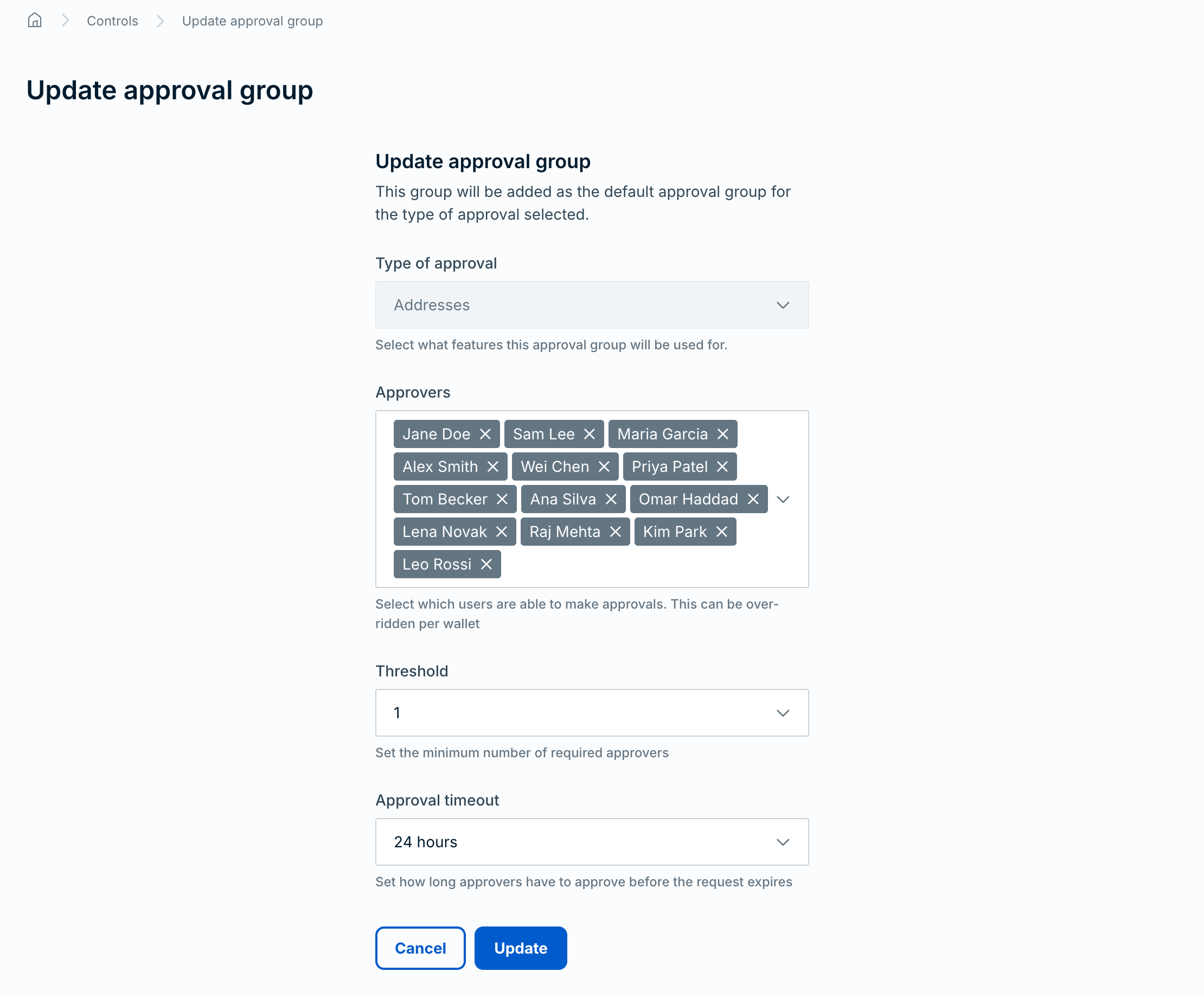
You can't change the approval type. To change the type, delete the approval group and create a new one.
If your organization uses an Approval groups approval group, updates remain pending until enough active owners approve them.
Required role: Owner or Administrator.
- On the Approval groups tab, find the approval group in the table.
- Open the Actions menu and select Delete.
The console doesn't ask you to confirm. It submits the deletion as soon as you select Delete. The console then shows Approval group deleted, or Approval group deletion pending if active owners must approve the deletion.
If your organization uses an Approval groups approval group, deletion remains pending until enough active owners approve it. To turn off approval requirements for approval group changes, delete the Approval groups approval group. Active owners must also approve that deletion.
- Separate initiators from approvers. Assign different users to create and approve transactions. This separation of duties reduces the risk of unauthorized actions.
- Govern addresses and policies, not just transactions. Require approvals on address book entries and policy rule changes to prevent unauthorized modifications to your security controls.
- Use API credential approvals. Require approval before new API credentials become active to prevent unauthorized programmatic access.
- Protect approval groups. Create an approval group with the Approval groups type so changes to approvers and thresholds require active owner approval.
- Maintain active owners. Keep enough owner users active to meet the approval group change threshold, especially before role or user lifecycle changes.
- Review approval timeouts. Set timeouts that balance speed with adequate review time. Too short (5 minutes) may cause legitimate requests to expire. Too long (24 hours) may delay operations.
- Start restrictive, then adjust. Begin with approval groups on every type in the Type of approval list. Remove them only after you understand your operational patterns and are confident the controls are no longer needed.
- Monitor approval activity. Use audit logging to track who approved what and when. Ripple Custody (Wallet) doesn't write a dedicated approval event for a decision. The decision appears as an access record of the approver's request, with the user ID, time, URL, and base64-encoded request body, so decode the body to see what the decision covers.
- Approvals — How approval groups work
- Step-up approvals — Require specific approvers for large transactions
- Manage users and roles — Assign the Approver role to users
- Configure audit logging — Track approval activity