Key resharing in MPC is a process similar to secret rotation in software. It refreshes key shares without changing the underlying private key. This can enhance security while keeping the cryptographic identity unchanged.
In Threshold Signature Schemes (TSS), key resharing involves generating a new set of key shares among participants while keeping the original private key consistent. This process ensures that even if some key shares were previously compromised, they become obsolete after resharing, mitigating long-term exposure risks.
Importantly, Ripple Custody (Wallet) performs key resharing in a fully distributed manner. The system never reconstructs the private key at any point during the resharing process.
This process is also commonly referred to as:
- Key share rotation
- Proactive secret sharing
- Key refresh
Regardless of the terminology, the goal remains the same: to enhance breach resilience, adapt to changes in an organization's quorum structure, and refresh cryptographic material over time.
Key resharing provides several important security benefits:
| Benefit | Description |
|---|---|
| Breach mitigation | Previously compromised key shares become obsolete |
| Long-term security | Reduces risk from persistent threats |
| Key continuity | Private key remains unchanged and wallet addresses stay the same |
| Compliance | Supports key rotation requirements |
During a coordinated reshare, the system refreshes each participant's key share into a new share. The mathematical relationship between shares changes, but the underlying private key remains the same.
Consider a 2-of-3 quorum with the following devices and shards:
Before resharing:
- CloudSign 1 holding shard
Sa1 - CloudSign 2 holding shard
Sa2 - CloudSign 3 holding shard
Sa3
After resharing:
- CloudSign 1 now holds shard
Sb1 - CloudSign 2 now holds shard
Sb2 - CloudSign 3 now holds shard
Sb3
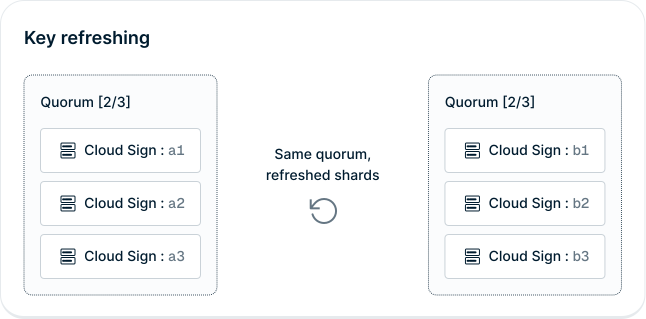
The old shards (Sa1, Sa2, Sa3) no longer sign transactions. Only the new shards (Sb1, Sb2, Sb3) can participate in signing.
Consider coordinating key resharing in these scenarios:
- Security policy - Rotate key shares when your internal security policy requires it.
- Suspected compromise - Invalidate potentially exposed shares.
- Personnel changes - Review resharing needs when users with device access leave the organization.
- Compliance requirements - Meet regulatory key rotation mandates.
- Security incidents - Include resharing in your incident response plan when appropriate. If you suspect key shard exposure, contact Ripple immediately.
Ripple Custody (Wallet) doesn't currently expose a customer-initiated key resharing action in the console, and it doesn't run key resharing automatically on a schedule. If you need to reshare key shards, contact Ripple support or your account team.
Before a coordinated reshare:
- Identify the quorum and wallets that require resharing.
- Confirm the business reason, such as a security incident, personnel change, or compliance requirement.
- Schedule a maintenance window with Ripple support and confirm the expected signing availability for affected wallets.
- Make sure the required quorum devices are online if Ripple Custody (Wallet) requires device participation.
- After Ripple Custody (Wallet) confirms completion, take fresh backups of each CloudSign node's database. Don't restore any node snapshot that you took before the reshare. Key shard backups in S3 need no action (see Backup compatibility).
Ripple support confirms which devices must be available during a coordinated reshare. If a required device is unavailable, the resharing may fail or require manual intervention.
After a successful reshare, previous key shards no longer participate in signing. Treat devices that held previous key shards as containing obsolete sensitive material until you decommission them through your device lifecycle process.
Ripple Custody (Wallet) has two kinds of backup, and resharing affects them differently.
Resharing and restructuring replace the key shards without changing the wallet's underlying key, so the encrypted key shard backups that Ripple Custody (Wallet) writes to S3 stay valid. Ripple Custody (Wallet) binds each backup file to the wallet's key ID and quorum ID, and neither of them changes. The backup file doesn't store the quorum ID, so keep it in your offline wallet inventory. You don't need to do anything to them, and Ripple Custody (Wallet) can't regenerate a key shard backup for an existing key in any case.
What does change is that the backup still holds the key shares of the devices that were in the quorum when you created the wallet. That doesn't affect recovery, because the recovery CLI reconstructs the private key from the backup itself rather than restoring shards to devices. It does mean that a backup isn't a record of your current quorum membership.
CloudSign node database snapshots are the opposite case. A snapshot taken before the reshare contains obsolete shards that mismatch the rest of the quorum.
Use key resharing carefully with CloudSign node database snapshots.
Restoring a node snapshot—created before the most recent resharing operation—on a single MPC node causes a mismatch between key shares across the quorum, rendering the key unusable.
To prevent this:
- Option 1: Avoid using local node snapshots with resharing
- Option 2: Take a new node snapshot immediately after each resharing event
Failure to follow these guidelines can result in permanent loss of access to funds.
See Maintain your backups and the restore constraints.
If you take CloudSign node snapshots:
- Document resharing events – Keep a log of when resharing occurs
- Invalidate old node snapshots – Mark pre-resharing node snapshots as obsolete
- Take new node snapshots immediately – After Ripple Custody (Wallet) confirms a reshare, take fresh node backups
- Verify snapshot compatibility – Before restoring, confirm that you took the snapshot after the last resharing
- Consider a snapshot-free approach – For maximum safety, rely on quorum redundancy instead of node snapshots
- Key restructuring – Change quorum participants while preserving the key
- MPC quorums – Create and manage quorums
- Understanding MPC-TSS – How MPC-TSS works
- MPC terminology – Key terms and definitions