Some Ripple Payments API operations paginate their responses to make the result set easier to handle. For example, if you request a list of objects that is potentially too large to handle efficiently, the operation returns the first batch of results along with a marker that you use to access the next batch of results. In Ripple Payments, this marker is a URL parameter, page, indicating the starting point.
For example, if you call GET /v4/payments, the default response includes five payments (the default size) on page=0 (the default page). If there are more payments to fetch (indicated by last=false in the API response), fetch the next set of payments by using the same endpoint with page=1.
We recommend that you fetch all the results on all pages before processing them. If you paginate over a moving list, you may miss some results.
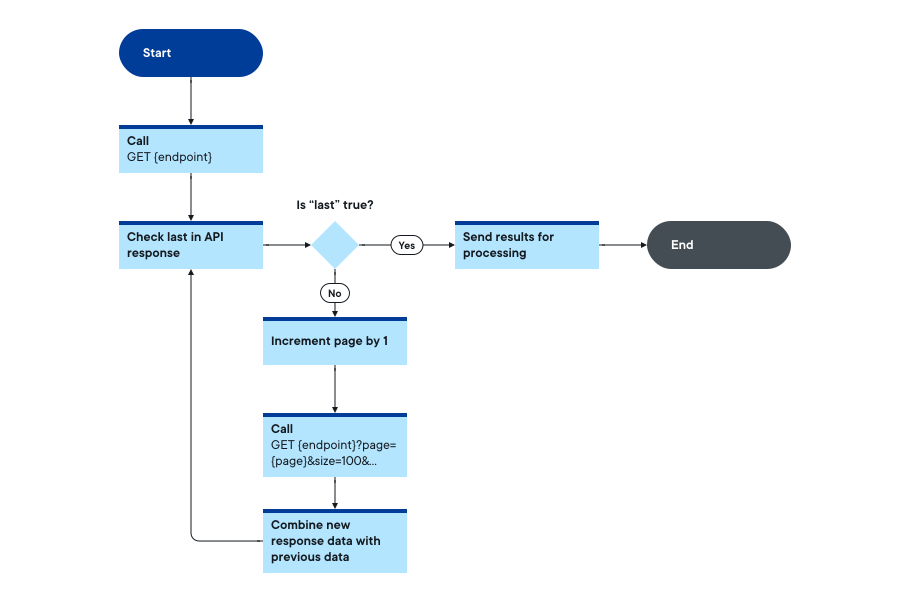
Choose the data you need to retrieve (payments, etc.). The HTTP method for all the data types is GET.
For example:
GET {ripplepayments_base_url}/v4/payments

Authorization: Bearer eyJhbGciO...l0ZSIwIm
To use pagination, add the page parameter to the request. Its default value is 0.
Your request becomes:
GET {ripplepayments_base_url}/v4/payments?page=X

Authorization: Bearer eyJhbGciO...l0ZSIwIm| Action | Completed |
|---|---|
| The full request |
| Action | Completed |
|---|---|
| Choose the data to retrieve (payments, ...) | |
Include the page parameter in the request |
Before processing the data you received with page=0, read and analyze the response.
This is a sample response from GET /v4/payments?page=0&size=3:
Click to show complete response
{
  "first": true,
  "last": false,
  "number": 0,
  "numberOfElements": 3,
  "size": 3,
  "totalElements": 30,
  "totalPages": 10,
  "sort": [
    {
      "direction": "ASC",
      "property": "string",
      "ignoreCase": true,
      "nullHandling": "NULLS_FIRST",
      "ascending": true,
      "descending": false
    }
  ],
  "content": [
    {
      "payment_id": "d485f100-2af7-4e48-9ab1-3c7e28775691",
      "contract_hash": "ccb23bd87f13cc13b9d616a9723f76e112aeac8628b2082e0f8bf3b8c670b103",
      "payment_state": "COMPLETED",
      "modified_at": "2019-10-01T18:25:47.347Z",
      "contract": {
        ...
      },
      "ripplenet_info": [
        ...
      ],
      "execution_condition": "PrefixSha256Condition{subtypes=[ED25519-SHA-256], type=PREFIX-SHA-256, fingerprint=sfGGHCrkyaMsLQNB62w_4zarlPChHKm47JkXVQbs1z0, cost=132360}",
      "crypto_transaction_id": "4e05da26-7872-4a1f-b9b7-db7604757c37",
      "validator": "rn.us.ca.san_francisco",
      "payment_type": "DIRECT",
      "execution_results": [
        ...
      ],
      "liquidation_execution_results": [
        ...
      ],
      "liquidation_details": {
        "id": "497f6eca-6276-4993-bfeb-53cbbbba6f08",
        "status": "string",
        "failure_reason": "string",
        "failure_count": 0
      },
      "push_forward_execution_results": [
        ...
      ],
      "accepted_at": "2019-10-01T18:25:47.347Z",
      "executed_at": "2019-10-01T18:25:47.347Z",
      "completed_at": "2019-10-01T18:25:47.347Z",
      "internal_info": {
        "connector_role": "RECEIVING",
        "labels": [
          {
            "label": "string"
          }
        ],
        "internal_id": "string"
      },
      "user_info": [
        ...
      ]
    },
    {
      "payment_id": "d1234567-2abc-4e48-9ab1-3c7e2877abcd",
      ...
    },
    {
      "payment_id": "dabcdefs-2123-4e48-9ab1-3c7e2877efgh",
      ...
    }
  ]
}
The first fields of the response are important:
{
    "first": true,
    "last": false,
    "number": 0,
    "numberOfElements": 3,
    "size": 3,
    "totalElements": 30,
    "totalPages": 10,
}
...
The above response indicates that 30 payments (totalElements) are available on 10 pages (totalPages).
last is a boolean indicating whether this is the last page of the response data.
Implement logic in your middleware to keep retrieving your data until last=true, and increment page by 1 for each call.
| Action | Completed |
|---|---|
| The full request |
| Action | Completed |
|---|---|
| Receive the successful response | |
Read last boolean field | |
If last=false, use pagination | |
| Else, process data |
Example Java code for pagination of GET /v4/payments response:
Payments payments = paymentsServices.getPaymentsFromAllPages(getPaymentsParams);

...

@Override
public Payments getPaymentsFromAllPages(GetPaymentsParams getPaymentsParams)
        throws RippleNetProblemException, RnAuthException {

    int page = 0;
    getPaymentsParams.setPage(page);

    // We retrieve the payments on page 0 first
    Payments payments = getPayments(getPaymentsParams);
    int numberOfElements = payments.getNumberOfElements();

    // If the page is not the last one
    while (!payments.isLast()) {
        // We increase the page by 1
        page++;
        getPaymentsParams.setPage(page);

        // We retrieve the payments on the incremented page
        Payments paymentsTemporary = getPayments(getPaymentsParams);

        // And for each payment on the new page
        for (Payment payment : paymentsTemporary.getContent()) {
            // we add it to the global list of Payments
            payments.addContentItem(payment);
            // we also update the total number of payments/elements in the payments object
            numberOfElements++;
            payments.setNumberOfElements(numberOfElements);
        }
        // Finally, at the end of the while loop, we update the first/last booleans
        // If page 1, for example, is the last, then the while loop will exit
        payments.setLast(paymentsTemporary.isLast());
        payments.setFirst(paymentsTemporary.isFirst());
    }

    LOGGER.info("Total amount of payments retrieved: {}", numberOfElements);
    LOGGER.info("Last page where payments were retrieved is page {}",
            getPaymentsParams.getPage());

    // Return the list of Payments
    return payments;
}After retrieving all the data on all pages, process the list containing your data in the content response field.
For example for payments.
| Action | Completed |
|---|---|
| If total number of payments > 0, then send them for processing | |
| else do nothing, wait for next polling |
if (payments != null) {
    if (payments.getNumberOfElements() > 0) {
        paymentsProcessor.processPayments(payments, hasSubStates);
    } else {
        LOGGER.info("No payments in {} states retrieved", getPaymentsParams.getStates());
    }
}| Action | Completed |
|---|---|
| Total number of data to process | |
Last page used |
| HTTP Status Code | Error Message | Description |
|---|---|---|
400 | invalid_request | Invalid Request parameters |
401 | Error 401 Unauthorized | Bad credentials, wrong authentication method OR the token can be expired |
403 | Forbidden | No handler found for GET |
500 | Server not available | Service is temporarily unavailable. |
| Name | Code | Action |
|---|---|---|
| Unauthorized | 401 | Credentials could have been altered by an administrator or renew the token. |
| Server not available | 500 | Retry three times every two seconds. If it fails, raise an alert. |
To handle retries with a 500 HTTP status code, the RippleNet Reference Implementation uses the Spring @Retryable annotation.
@Retryable(value = {RippleNetProblemTemporaryException.class},
            maxAttempts = 3,
            backoff = @Backoff(maxDelay = 2000, random = true))
    Payments getPayments(GetPaymentsParams getPaymentsParams)
            throws RippleNetProblemException, RnAuthException;