The beneficiary management feature allows you to add, edit, or delete payment beneficiaries using the Payments Direct UI.
This topic describes how you can manage beneficiary identities. For more information on how to manage originator identities, see Originator management.
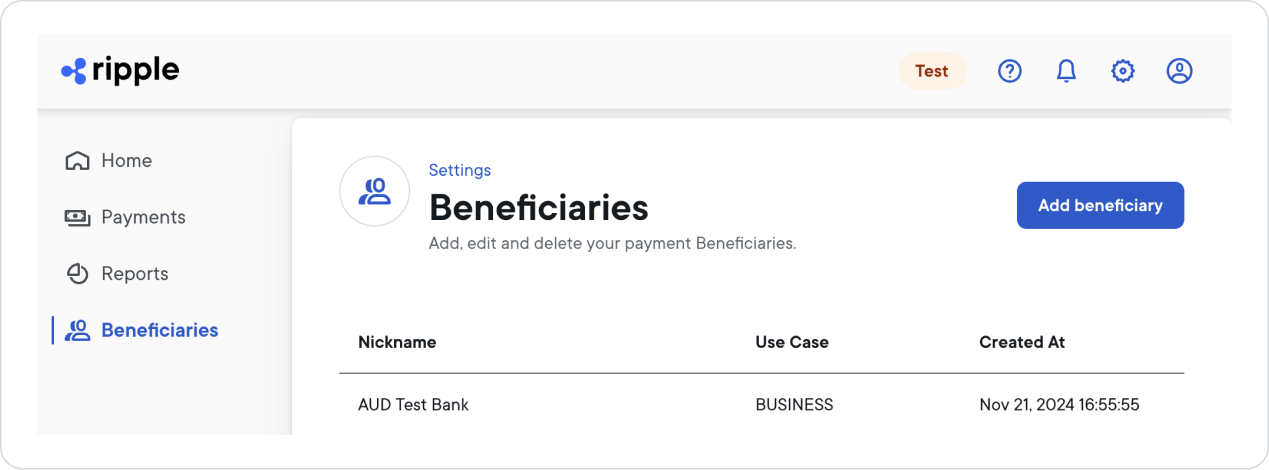
To add a beneficiary identity:
From the left side navigation, select Beneficiaries > Add Beneficiary.
Select whether the beneficiary identity you want to create is for a Business or Person (Individual).
From the Destination Country dropdown list, select the country where your beneficiary will receive the payment.
For an overview of all supported payout countries and currencies, see Payout network.Note:Bank account is currently the only supported payout category.
Select Next.
Fill in all fields related to identity details and then select Next.
Important: Beneficiary identity details must match the beneficiary’s bank records. Mismatches can cause rejections, returns, or recalls. These mismatches are sometimes reported as “Invalid account” even when the account number format is correct.
- Match the bank’s records exactly: legal name (individual or business), and any required identifiers (for example, date of birth, tax ID, registration number).
- Verify before you pay: use a recent bank statement or an official bank letter (for example, a direct deposit letter).
- Use the corridor’s supported character set: some payout rails accept only specific characters (for example, Latin letters without diacritics). If the corridor does not support special characters, enter the spelling that matches the bank’s records in the supported character set.
Example: If the beneficiary’s bank records use a Latin spelling without diacritics (for example, "
Di na"), entering a different name (for example, "Tina") or unsupported characters can cause payout failure.Fill in all fields related to bank information.
Note:A beneficiary identity can only be associated with one payout method.
Select Finish.
This creates the new beneficiary identity.To confirm that the new beneficiary identity is available for selection when you create a new payment, view the list of identities by selecting Beneficiaries.
To view beneficiary identity details:
- From the left side navigation, select Beneficiaries.
- Locate and select the beneficiary identity for which you want to see details.
The beneficiary details will be displayed on the right side.
To edit a beneficiary identity:
- From the left side navigation, select Beneficiaries.
- Locate and select the beneficiary identity you want to edit.
- In the panel on the right side, next to 'Identity Details' or 'Bank Information', select the
 icon.
icon. - Change all info as needed and then select Save.
Grayed out fields contain the beneficiary identity's core information and can't be edited.
Your beneficiary identity is now updated with the new information you provided.
To delete a beneficiary identity:
- Select Beneficiaries.
- Locate and select the beneficiary identity you want to delete.
- In the panel on the right side, select ... > Delete.
- In the Delete Beneficiary window, confirm that you want to delete the beneficiary identity by selecting Confirm.
Your beneficiary identity is now deleted from your identities list and will no longer be available for selection when you create a new payment.