Notification webhooks are the recommended way to track payment state changes in Payments Direct. However, if your integration cannot support inbound webhook delivery (for example, due to network restrictions or firewall rules that prevent a public HTTPS callback URL), you can poll the API to detect payment updates.
This topic describes when and how to poll effectively, and covers two complementary patterns:
- Single-payment polling: track the state of a specific payment by
paymentId - Bulk search polling: detect all payments updated since a given timestamp
Polling and webhooks are not mutually exclusive. Even when webhooks are your primary notification mechanism, a periodic bulk search poll is a useful safety net to catch any state transitions your webhook handler may have missed due to delivery failures or out-of-order delivery.
| Pattern | Best for |
|---|---|
| Single-payment polling | Tracking the outcome of a specific payment you just created |
| Bulk search polling | Reconciling all payments updated since your last check; catching missed webhook notifications |
Use GET /v3/payments/{paymentId} to check the current state of a specific payment.
Example: Poll for a payment by ID
curl -X GET "https://{base-url}/v3/payments/5ce2c433-a96d-48d0-8857-02637a60abf4" \
  -H "Authorization: Bearer <access_token>"
Response (200 OK)
{
  "paymentId": "5ce2c433-a96d-48d0-8857-02637a60abf4",
  "paymentState": "TRANSFERRING",
  "initiatedAt": "2025-10-01T14:00:00.000Z",
  "updatedAt": "2025-10-01T14:00:45.321Z",
  "expiresAt": "2025-11-30T14:00:00.000Z"
}
Repeat the request on a fixed interval until the payment reaches a terminal state: COMPLETED, FAILED, DECLINED, or RETURNED.
If you are comparing multiple responses, use updatedAt to determine the most recent state. Do not rely on the order in which responses arrive, as network conditions can cause responses to arrive out of sequence.
- Poll no more frequently than every 30 seconds for active payments.
- For payments in the early
INITIATEDorVALIDATINGstates, a 30 to 60 second interval is appropriate. - Once a payment reaches
TRANSFERRING, the time to completion depends on the corridor and payout rail. Adjust your interval to match your SLA requirements. - Stop polling when the payment reaches a terminal state (
COMPLETED,FAILED,DECLINED,RETURNED).
| HTTP status | Action |
|---|---|
200 OK | Read paymentState and continue polling if not terminal |
404 Not Found | The payment ID is invalid or does not belong to your account |
429 Too Many Requests | Apply exponential backoff before retrying (see Exponential backoff) |
500 / 503 | Retry with exponential backoff; alert if the condition persists |
Use POST /v3/payments (Search payments) to retrieve all payments whose state was last updated within a time range. This is the recommended approach for reconciliation and for integrations that process high volumes of payments.
The key filter combination:
filterRangeType: PAYMENT_STATUS_LAST_UPDATED: filter by the time a payment last changed stateafterTimestamp: the timestamp of your last successful poll (your "cursor")beforeTimestamp: the current time (optional but recommended to avoid processing in-flight updates)
curl -X POST "https://{base-url}/v3/payments" \
  -H "Authorization: Bearer <access_token>" \
  -H "Content-Type: application/json" \
  -d '{
    "filter": {
      "filterRangeType": "PAYMENT_STATUS_LAST_UPDATED",
      "afterTimestamp": "2025-10-01T14:00:00Z",
      "beforeTimestamp": "2025-10-01T14:05:00Z"
    },
    "page": {
      "size": 100
    }
  }'
Response (200 OK)
{
  "data": [
    {
      "paymentId": "5ce2c433-a96d-48d0-8857-02637a60abf4",
      "paymentState": "COMPLETED",
      "updatedAt": "2025-10-01T14:03:12.000Z"
    },
    {
      "paymentId": "a1b2c3d4-e5f6-7890-abcd-ef1234567890",
      "paymentState": "FAILED",
      "updatedAt": "2025-10-01T14:04:55.000Z"
    }
  ],
  "filter": { "filterRangeType": "PAYMENT_STATUS_LAST_UPDATED", "afterTimestamp": "2025-10-01T14:00:00Z", "beforeTimestamp": "2025-10-01T14:05:00Z" },
  "page": {
    "size": 100,
    "lastPageToken": "eyJrZXkiOiJhMWIyYzNkNCJ9"
  }
}If the response includes a page.lastPageToken, there are more results. Include it in your next request to retrieve the next page.
curl -X POST "https://{base-url}/v3/payments" \
  -H "Authorization: Bearer <access_token>" \
  -H "Content-Type: application/json" \
  -d '{
    "filter": {
      "filterRangeType": "PAYMENT_STATUS_LAST_UPDATED",
      "afterTimestamp": "2025-10-01T14:00:00Z",
      "beforeTimestamp": "2025-10-01T14:05:00Z"
    },
    "page": {
      "size": 100,
      "lastPageToken": "eyJrZXkiOiJhMWIyYzNkNCJ9"
    }
  }'
Continue paginating until a response returns no lastPageToken. At that point, all results for this time window have been retrieved.
After exhausting all pages for a time window, record the beforeTimestamp from that request as your new afterTimestamp for the next poll cycle.
afterTimestamp (next poll) = beforeTimestamp (this poll)This creates a stable, non-overlapping cursor that prevents you from missing state transitions between polls.
Set beforeTimestamp to the current time before you begin paginating, and hold it constant for all pages in the same poll cycle. If you use a moving timestamp across pages, you risk missing updates that occurred while you were paginating.
- Run your bulk search poll every 1–5 minutes depending on your volume and reconciliation SLA.
- For high-volume integrations, a 1-minute interval with
page.size: 100provides a good balance of timeliness and API efficiency. - If a poll cycle returns zero results, back off slightly (for example, double the interval, up to a maximum of 10 minutes) to reduce unnecessary load.
When a payment reaches a terminal state (COMPLETED, FAILED, DECLINED, or RETURNED), stop polling for that payment and process the outcome.
For FAILED, DECLINED, and RETURNED states, the webhook payload (and the search results) do not include error details. To get the reason for failure, call GET /v3/payments/{paymentId} after detecting the terminal state.
For more information on terminal states and their meanings, see Payment lifecycle.
Apply exponential backoff with jitter when you receive 429 Too Many Requests or 5xx server errors:
- On the first failure, wait a short base interval (for example, 2 seconds).
- On each subsequent failure, double the wait time.
- Add random jitter (for example, ±10–20% of the interval) to prevent synchronized retry storms.
- Cap the maximum wait at a reasonable ceiling (for example, 5 minutes).
- After a configurable number of retries with no success, alert your on-call team.
Example backoff schedule:
| Retry | Wait before retry |
|---|---|
| 1 | 2s |
| 2 | 4s |
| 3 | 8s |
| 4 | 16s |
| 5 | 32s |
| 6+ | 60s (cap) |
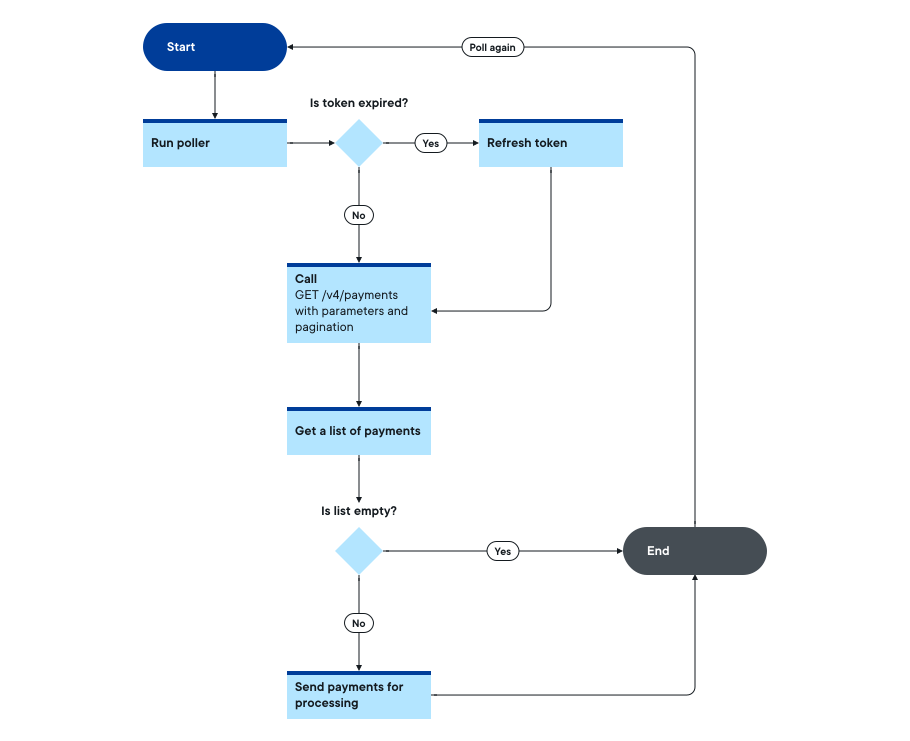
The following flowchart illustrates the bulk search polling loop, including pagination and cursor advancement.
- To receive push notifications instead of polling, see Notification webhooks.
- For guidance on the payment states your poll responses will return, see Payment lifecycle.
- For the full search payments API reference, see Search payments (v3).