The Unified Indexer Service (UIS) is our next-generation blockchain indexing technology. Previously only available on our SaaS platform, the UIS is available for on-premises customers from v1.26. It introduces a decomposed, chain-specific adapter architecture that allows Ripple Custody to add new blockchain integrations faster and at scale, while improving resilience, performance, and operational simplicity.
For a complete and up-to-date list of which ledgers are supported, please refer to the Supported blockchain ledgers page.
For on-premises customers: If you're migrating from legacy indexers to UIS, see the UIS on-premises migration guide for step-by-step instructions.
The Unified Indexer Service introduces a modern, component-based architecture that replaces the legacy monolithic indexers. Understanding these components helps you plan your deployment and troubleshoot issues.
The UIS consists of several key components that work together:
| Component | Description |
|---|---|
| Generic Indexer | The core orchestration engine that fetches blockchain data and stores it in a common format. While the indexer code is generic and reusable, a separate instance is deployed for each ledger and network combination (e.g., uis-indexer-solana-devnet, uis-indexer-xrpl-testnet). |
| Processor | Handles business logic and generates standardized events from indexed data. It reads from the Generic Indexer's outbox table and creates customer-facing events. This indexed data is then served by the Events API. |
| Ledger Adapters | Chain-specific translation layers that connect to blockchain nodes and convert blockchain-specific data into the unified model consumed by the Generic Indexer. Each supported blockchain (Solana, TRON, Ethereum, etc.) has its own adapter. Note: XRPL currently uses its own specific indexer with an internal adapter; a separate ledger adapter for XRPL will be available in a future release. |
| Ledger APIs | Provide RESTful interfaces for accessing live blockchain data directly from the nodes. These APIs return stateless data and are called by ledger adapters or other components when checking balances, creating transactions, broadcasting transactions, or getting fees. These are stateless and can scale horizontally. |
| Events API | Provides RESTful interface for accessing indexed data. This is the primary interface where indexed data is accessed by consumers (like Ledger Accounting). Handles authentication and provides HTTP endpoints for consumers to pull events. The UIS uses a pull-based model rather than pushing webhooks. |
| API Gateway | Single entry point for all UIS communication, routing requests to appropriate internal services. |
All installed UIS components are required for proper operation. The system is designed as an integrated whole, and removing any component will cause failures.
For example, if you are using Solana:
| Component | Status | Description |
|---|---|---|
| Generic Indexer (per ledger/network) | Required | A dedicated instance orchestrates data fetching for each ledger/network (e.g., mainnet, devnet). |
| Event Processor | Required | Generates events for Ledger Accounting |
| Events API | Required | Provides the pull-based interface for event consumption |
| Solana Ledger Adapter | Required | Translates Solana-specific data |
| Solana Ledger API | Required | Provides access to live Solana blockchain data |
Each component plays a critical role in the data flow pipeline.
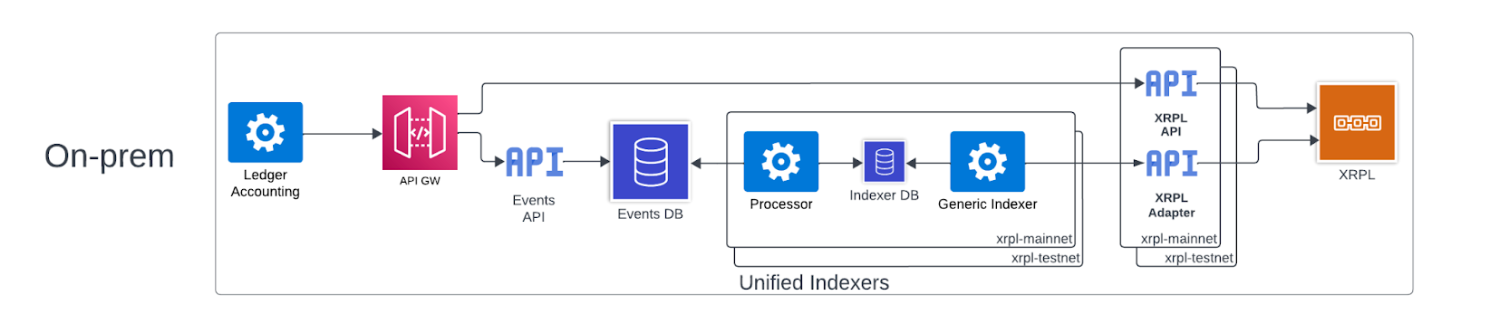
Data flow:
- Ledger Adapters (one per ledger/network) connect to your blockchain nodes and fetch blockchain data
- Generic Indexer (one instance per ledger/network, stateful, runs continuously) orchestrates data fetching through adapters
- After data is fetched, Generic Indexer performs indexing and stores indexed data in outbox table
- Processor reads outbox table and generates standardized events
- Processor writes events to the database
- Events API reads from the database and provides indexed data to consumers
- Ledger Accounting pulls events via Events API
- Ledger APIs (one per ledger/network, stateless) provide direct access to live blockchain data from nodes (not indexed data)
The UIS uses the Bulkhead Pattern for fault isolation. Three components are run for each ledger and network combination:
- Ledger API - Provides access to live blockchain data for that specific ledger/network
- Ledger Adapter - Translates blockchain-specific data for that ledger/network
- Generic Indexer - Orchestrates data fetching for that specific ledger/network
These three components are duplicated for each ledger and network. This means:
- Network-level isolation: If XRPL testnet goes down, XRPL mainnet remains unaffected
- Ledger-level isolation: If Solana experiences issues (node failure, resource spike), it does not impact XRPL, TRON, or other ledgers
- Independent scaling: Each ledger/network combination can be scaled independently based on its specific needs
This isolation ensures that failures are contained and do not cascade across the system.
Ripple Custody supports a wide range of blockchains. Depending on the chain, indexing is handled either by the Unified Indexer Service (UIS) or by a standalone indexer. Upon upgrade to v1.26:
- Solana, TRON and XRPL use the UIS. They do not require any additional configuration.
- Arbitrum, Base and Optimism must be configured to use the UIS to be operable. See Configuration for more detail.
- Ethereum, Polygon and Stellar continues to use existing standalone indexers unless you explicitly configure them to use UIS. See Configuration for more detail.
These requirements are current as of the v1.26 LTS release in October 2025.
For an on-premises deployment of the UIS, you are responsible for provisioning and maintaining your own blockchain nodes. The service must be able to connect to these nodes to index transactions. Please ensure your nodes meet the following minimum specifications.
| Blockchain | Node type | Minimum version | Connection | Archive requirement | Additional details |
|---|---|---|---|---|---|
| Arbitrum | Geth compatible | v3.7.X | JSON-RPC over HTTP | Non-Archive | Debug mode must be enabled. |
| Base | Geth compatible | v0.14.1 | JSON-RPC over HTTP | Non-Archive | Debug mode must be enabled. |
| Ethereum | Geth | v1.16.4 | JSON-RPC over HTTP | Archive (Required) | Debug APIs must be enabled. High request volume (~1.2k - 300k/hour). |
| Optimism | Geth compatible | v1.101511 | JSON-RPC over HTTP | Non-Archive | Debug mode must be enabled. |
| Polygon | Geth compatible | v1.16.4 | JSON-RPC over HTTP | Archive (Required) | Debug mode must be enabled. |
| Solana | Agave | mainnet 2.3.10 / devnet 3.0.0 | JSON-RPC over HTTP | Archive Recommended | Estimated request volume is ~9000/hour. No debug mode needed. |
| Stellar | Horizon | v23.0.0 | HTTP | Archive (Preferred) | Requires application/x-www-form-urlencoded content-type for broadcasting transactions. |
| TRON | FullNode | v4.8.0 | RPC over HTTP | Archive (Preferred) | Estimated request volume is ~150k/day. |
| XRPL | FullNode | 2.6.X | HTTP | Archive Recommended | Request volume is not based on tracked accounts. |
For SaaS customers, no configuration is required. The UIS is automatically enabled and managed by Ripple.
For on-premises deployments, UIS is available upon upgrade to v1.26 or later.
Automatically migrated to UIS (no configuration required):
| Chain | Status |
|---|---|
| Solana | Will automatically use UIS |
| XRPL | Will automatically use UIS |
| TRON | Will automatically use UIS |
Must be explicitly configured to use UIS:
| Chain | Status |
|---|---|
| Arbitrum | Required to use UIS (will not work without it) |
| Base | Required to use UIS (will not work without it) |
| Optimism | Required to use UIS (will not work without it) |
| Ethereum | Optional (can continue using legacy indexer or migrate to UIS). Legacy and UIS have feature parity. |
| Polygon | Optional (can continue using legacy indexer or migrate to UIS) |
| Stellar | Optional (can continue using legacy indexer or migrate to UIS). Note: Stellar Tokens are only supported with UIS; they are not available on the legacy indexer. |
EVM chains like Arbitrum, Base, and Optimism will not work unless configured to use UIS.
Other EVM chains like Ethereum and Polygon can optionally use UIS or continue with legacy indexers. Legacy and UIS have feature parity for Ethereum.
Stellar can also optionally use UIS or continue with legacy indexers. However, Stellar Tokens are only supported with UIS and are not available on the legacy indexer.
Migrating a chain to the Unified Indexer is a one-way process and cannot be rolled back.
Please plan your migration carefully. For any questions about the deployment process, please contact your CPE or our Support team.
To enable UIS for a specific chain, set the type parameter to "uis" in that network's configuration block within your helm chart's values.yaml file.
The example code below shows the correct structure for enabling the UIS for an Optimism Sepolia testnet:
ledgers:
  evm:
    networks:
      - name: optimism-sepolia
        type: "uis"  # Enable UIS for this network
        raw_config: |
          tracker.opindexer-sepolia.base-url = "http://api-management-uis"
          ...
        indexer:
          ...
          node:
            # URL for your provisioned Optimism Sepolia node.
            url: "http://your-optimism-sepolia-node-url"
For complete step-by-step migration instructions, including pre-migration setup, database preparation, and validation steps, see the UIS on-premises migration guide.