Telemetry configuration is an important part of on-premise Ripple Custody deployments. It defines how the platform collects, processes, and sends telemetry data to the appropriate server.
This task applies to on-premise deployments only.
Before you configure telemetry, you need a basic understanding of the following:
- Kubernetes
- Helm chart configuration
- Helm chart configuration, especially values.yaml
- The OpenTelemetry Protocol (OTLP)
- OpenTelemetry Collector
Ripple Custody supports two types of telemetry protocols:
- OpenTelemetry Protocol (OTLP)
- Remote System Logs (rSysLog)
OTEL is an open-source observability framework that generates, collects, and describes telemetry data from applications such as Ripple Custody.
OpenTelemetry Protocol (OTLP) is a set of APIs, libraries, agents, and instrumentation standards for the generation, collection, and description of telemetry data (traces, metrics, and logs). OTEL refers to the OpenTelemetry project, whereas OTLP refers to the set of standards for implementing and using OTEL.
Implementation of OTEL in Ripple Custody can help you diagnose and fix issues, optimize performance, and understand user behavior.
For more information about the vendors officially supporting OTEL, see Vendor list supporting OTEL.
For a deep dive into how it works and how to use it, see the OTEL project's official documentation.
OTLP is the encoding protocol that OTEL uses to transmit telemetry data from client applications to backends. The OTLP specification document describes the encoding, transport, and delivery mechanism of telemetry data between telemetry sources, intermediate nodes such as collectors, and telemetry backends.
OTEL automatically captures telemetry data, such as latency or error data, from a Ripple Custody deployment. This data is enriched with context, such as user or transaction information, processed, and then sent to OTEL observability backends for analysis.
OTEL captures data from the following sources:
- Traces: Flow and latency of requests and transactions through microservices and distributed systems.
- Metrics: State of the system at a specific point in time, for example CPU usage, memory consumption, or number of active users.
- Logs: Application, system, and device logs.
The OTEL SDK library facilitates the export of telemetry data through OTLP to OTEL compatible endpoints.
Most Ripple Custody components and indexers can export telemetry data using the OTEL SDK.

You can find more information about support for the OTEL SDK in the OpenTelemetry Compliance Matrix.
Syslog is a standard for message logging in Unix-based systems. rSyslog is a Syslog daemon for sending logging messages across IP networks. Use it for troubleshooting, auditing, and monitoring systems.
rSyslog allows processes to send event notification messages over TCP, UDP, and RELP (reliable event logging protocol) to event message collectors. Messages contain data from logs the operating system generates. The Syslog API collects this data and sends it to an rSyslog daemon. Syslog cannot change the format or the information it includes.

Many telemetry platforms can ingest Syslog/rSyslog messages directly, using the following methods:
Agents: Some platforms use agents, for example OTEL Collector, to pull or receive Syslog events and transform them into a format suitable for the telemetry platform.
Brokers/processors: Middleware, for example Apache Kafka or Logstash, can consume logs from rSyslog and distribute them to multiple destinations, including telemetry systems.
This table provides an overview of the strengths and weaknesses of the protocols.
Ripple Custody supports both protocols. We recommend you use OTLP.
| Criteria | OTLP | rSyslog |
|---|---|---|
| Purpose | Specifically designed for telemetry | Designed for event and logging messages |
| Design | Supports request/response and streaming export | Doesn't natively understand telemetry nuances |
| Efficiency | Efficient serialization/deserialization | Text-based encoding may be less efficient |
| Integration with observability tools | Integrated into broad ecosystem with good support in modern tools | Widely supported due to longevity, but might not be optimized for modern telemetry tools |
| Flexibility and evolution | Expected to evolve quickly, not constrained by legacy | Evolution might be challenging due to wide adoption |
| Multiplexing | Supports multiplexed telemetry types | Doesn't natively support multiplexing |
| Reliability | Built-in features like acknowledgments, retries, and back-off | Mechanisms for reliability exist, but might not be as comprehensive |
| Context preservation | Can preserve and transmit context information | Doesn't have native mechanisms for telemetry context |
We recommend you use the following best practices for OTEL integration.
Before you use the OTEL SDK, you need to familiarize yourself with its internal workings and configure it using the OTEL environment variable specification.
An important part of the OTEL SDK configuration is the Batch LogRecord Processor (BLRP). Logs best practices describes the BLRP environment variables in the context of Ripple Custody.
OTLP is a request-response style protocol: the clients send requests, and the server replies with corresponding responses. The client continuously sends a sequence of requests to the server and expects to receive a response to each request:
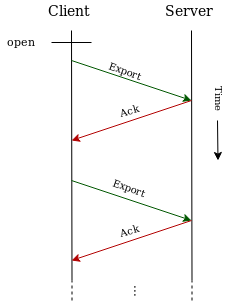
OTLP aims to ensure that no data is lost in transit between client-server node pairs. However, many telemetry collection systems have intermediary nodes that the data must travel through before reaching the final destination, for example, application -> agent -> collector -> backend. OTLP does not provide end-to-end delivery guarantees.
The acknowledgements described below happen between a single client-server pair and do not span intermediary nodes in multi-hop delivery paths.
The OTEL SDK provides out-of-the-box support for data reception acknowledgement and for temporarily queuing the logs in memory if the OTEL endpoint is down.
If the OTEL endpoint of the OTEL SDK is not the final destination, but an intermediary between the OTEL SDK and the final telemetry data store, for example, OTEL Collector, the telemetry data stays in the working memory of the intermediary between the OTLP reception acknowledgment and its export to the final data store.
If the intermediary crashes, there is no guarantee that the telemetry data will persist and it may be lost.
We recommend that you configure the telemetry collection systems so that the OTEL SDK directly exports the logs and other telemetry data directly to the final destination to guarantee the logs are not lost in transit, as long as the endpoint supports OTLP.
OTEL Collector is a vendor-agnostic implementation to receive, process, and export telemetry data. It removes the need to maintain multiple agents and collectors to which instrumentation libraries export their telemetry data. It also supports sending Open Source observability data format, for example, Jaeger, Prometheus, and Fluent Bit, to open source or commercial backends.

The Ripple Custody components use the OTEL SDK and rSyslog to send telemetry data to OTEL Collector.
You can use OTEL Collector in infrastructures where the telemetry backends do not support OTLP out-of-the-box.
OTEL Collector handles logs, traces, and metrics through a pipeline. A dedicated pipeline handles each telemetry type (logs, traces, or metrics).
We recommend that you handle logs exported from the OTEL SDK and logs exported from Syslog through separate pipelines in OTEL Collector. They have different key-value fields that may not be mutually compatible.
For information on how to deploy OTEL Collector, see OTEL Collector deployment.
When using the rSyslog protocol with a Syslog receiver, we recommend you use the TCP network protocol, since log truncation is a known limitation of using rSyslog with the UDP protocol.
Known UDP network protocol limitations with rSyslog:
UDP size limitations: The maximum size of a UDP datagram is technically 65,535 bytes, but in practice, due to the limitations imposed by the IPv4 protocol (which caps the maximum IP packet size at 65,535 bytes, including header information) and Ethernet frame size, Syslog messages are often limited to much smaller sizes. Typically, most devices and platforms will truncate or split Syslog messages sent over UDP that exceed 1,500 bytes, or, in many cases, even less.
Reliability: UDP is a connectionless protocol, which means there's no guarantee that the packets will arrive at their destination nor in the correct order. There's no built-in mechanism for retransmitting lost packets, as there is with TCP.
- Telemetry configuration - Configure telemetry settings in Helm charts
- OTEL Collector deployment - Deploy and configure the OTEL Collector