After initiation, transactions progress through governance approval, signing, broadcast, and blockchain confirmation, each with distinct statuses.
- Internal statuses: Pending → Preparing → Reserved → Prepared → Broadcasting → Completed.
- Ledger statuses: Detected → Confirmed (or Replaced/Expired).
- Hot vaults sign automatically. Cold vaults require manual intervention.
- Finality is blockchain-specific. Some chains confirm in seconds, others take minutes.
Understanding transaction statuses is essential for operations and support. Each status indicates where a transaction is in the pipeline and what might be blocking it. "Preparing" often means fee conditions aren't met; "Pending" means awaiting approvals; "Broadcasting" means it's on the network awaiting confirmation. Cold vault transactions require additional operational procedures.
For architects and operators: Set up monitoring and alerting on transaction status distributions. Define SLAs for each phase. For cold vault deployments, establish clear procedures for the air-gapped signing process and ensure operators understand the workflow.
Before reading this page, you should understand:
- Transactions - The overall transaction lifecycle and flow
- Transaction initiation - How to start a transaction
To understand transaction processing, you need to be familiar with a few blockchain concepts:
| Concept | Description | Non-technical explanation |
|---|---|---|
| UTXO | Unspent transaction output - a digital currency resource used for transactions on Bitcoin-type ledgers. It represents a certain amount of cryptocurrency that was authorized by a sender and is available to be spent by a beneficiary. | Think of UTXOs as individual coins in your wallet. When you spend, you use whole coins and receive change back. |
| Nonce | A transaction counter, starting at 0, that represents the number of operations sent to an Ethereum Virtual Machine (EVM) blockchain from an account. | A sequence number that ensures your transactions are processed in order, and prevents duplicates. |
| Gas | A measure of how much a transaction costs on an Ethereum Virtual Machine blockchain. | The "fuel" required to run your transaction—more complex operations need more gas. |
A blockchain transaction moves through the following statuses:
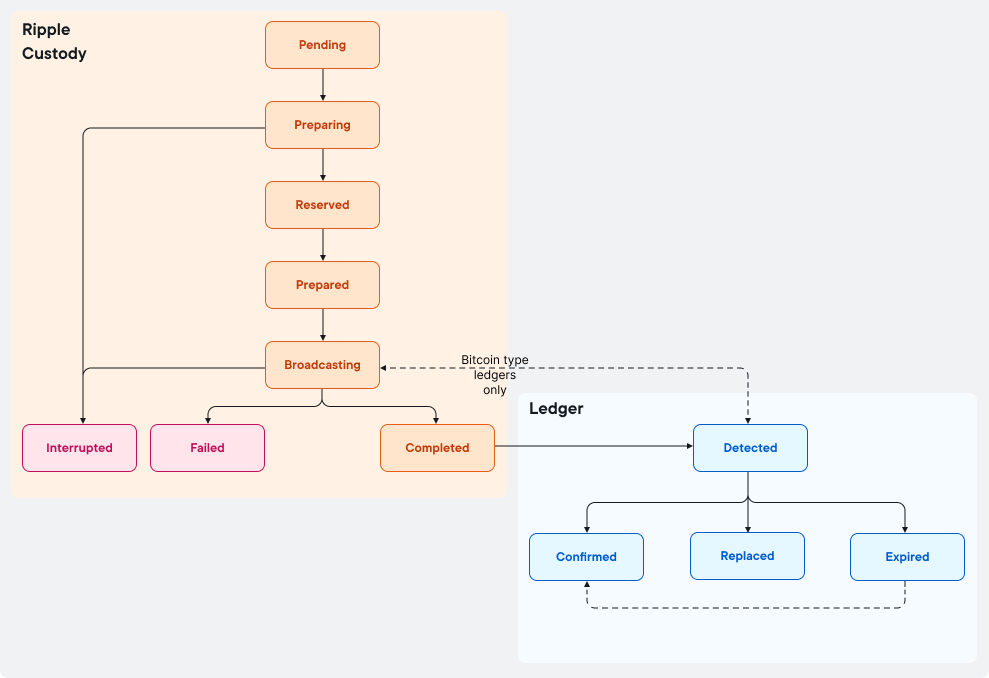
The flow is the same for all ledgers, apart from Bitcoin-type ledgers, which go through an additional step.
While still in Ripple Custody, the transaction can have the following statuses:
| Status | Description | What this means |
|---|---|---|
Pending | Transaction order is approved by the policy engine. | Your transaction passed governance checks and is queued for processing. |
Preparing | The ledger accounting service fetches the executable transaction order and retrieves data from the ledger nodes (for example, nonce, UTXO, or fees). The information is stored in the database. Note that the transaction remains on hold (Preparing status) until the network conditions make it possible to broadcast it within the acceptable fee levels. | The system is gathering blockchain data needed to build your transaction. If fees are too high, it waits here. |
Reserved | The necessary resources were allocated for the transaction (for example, nonce or UTXO), which impacts the Reserved balance of the account. | Funds are set aside for this transaction and won't be used for other transactions. |
Prepared | The notary has produced a signature of executability for the vault, which will verify, construct, and sign the transaction. | The governance engine has approved the transaction for signing. |
Broadcasting | The ledger accounting service broadcasts the transaction and tracks its status. | Your transaction has been sent to the blockchain network. |
Completed | All processing is complete and the transaction was successfully broadcast. The transaction is no longer within the control of Ripple Custody. The amount of time for the transaction to be processed depends on the number of blocks the ledger needs to reach finality. For more details, see Transaction finality. | Ripple Custody has done its job — now we're waiting for the blockchain to confirm it. |
Failed | A transaction can fail for multiple reasons, such as:
| Something went wrong. Check the error details to understand what happened. |
In addition, Ripple Custody includes status Interrupted for internal use only.
Once on chain, the transaction can have a number of blockchain-specific statuses:
| Status | Description | What this means |
|---|---|---|
Detected | The transaction is visible in the first block of the ledger. For Bitcoin ledgers, this status applies if the transaction is either visible in the mempool or the first block. | The blockchain has received your transaction and included it in a block. |
Replaced | Following a user request to replace a transaction with a new one, the transaction is being replaced on-chain. | You requested a replacement transaction (e.g., with higher fees), and it's being processed. |
Confirmed | The transaction is validated in the required number of blocks to reach finality. For more information, see Transaction finality. | Your transaction is complete and irreversible. The blockchain has permanently recorded it. |
Expired | Confirmation was not reached within the set time. | The transaction wasn't confirmed in time. You may need to resubmit. |
A transaction is fully complete when it reaches Confirmed status. At this point, the transaction has been validated by the blockchain and is irreversible. The number of confirmations required varies by blockchain—see Transaction finality for details.
For a complete status summary table, see Transactions reference.
When a transaction reaches the Confirmed status on the ledger, the transaction sent by the user is included in a block of the chain, however, this does not automatically mean that the action described in the transaction was executed. The action is not executed if the transaction breaks a rule on the ledger or the transaction contains a mistake, for example:
- The data string sent to a smart contract is malformed.
- The operation is reverted for lack of gas.
- A non-authorized staking operation is submitted.
- The address of the recipient is faulty.
- A token was sent that was not previously associated with the recipient address.
Ripple Custody supports two vault architectures for transaction signing: hot vaults (network-connected) and cold vaults (air-gapped). Both follow the same governance and approval process, but differ in how the signed transaction reaches the blockchain.
For more information about the system components described in these flows, see System architecture.
The following table describes the complete transaction flow. Steps 1-10 are identical for both hot and cold vaults. The flow diverges at step 11, where the vault receives the operation query.
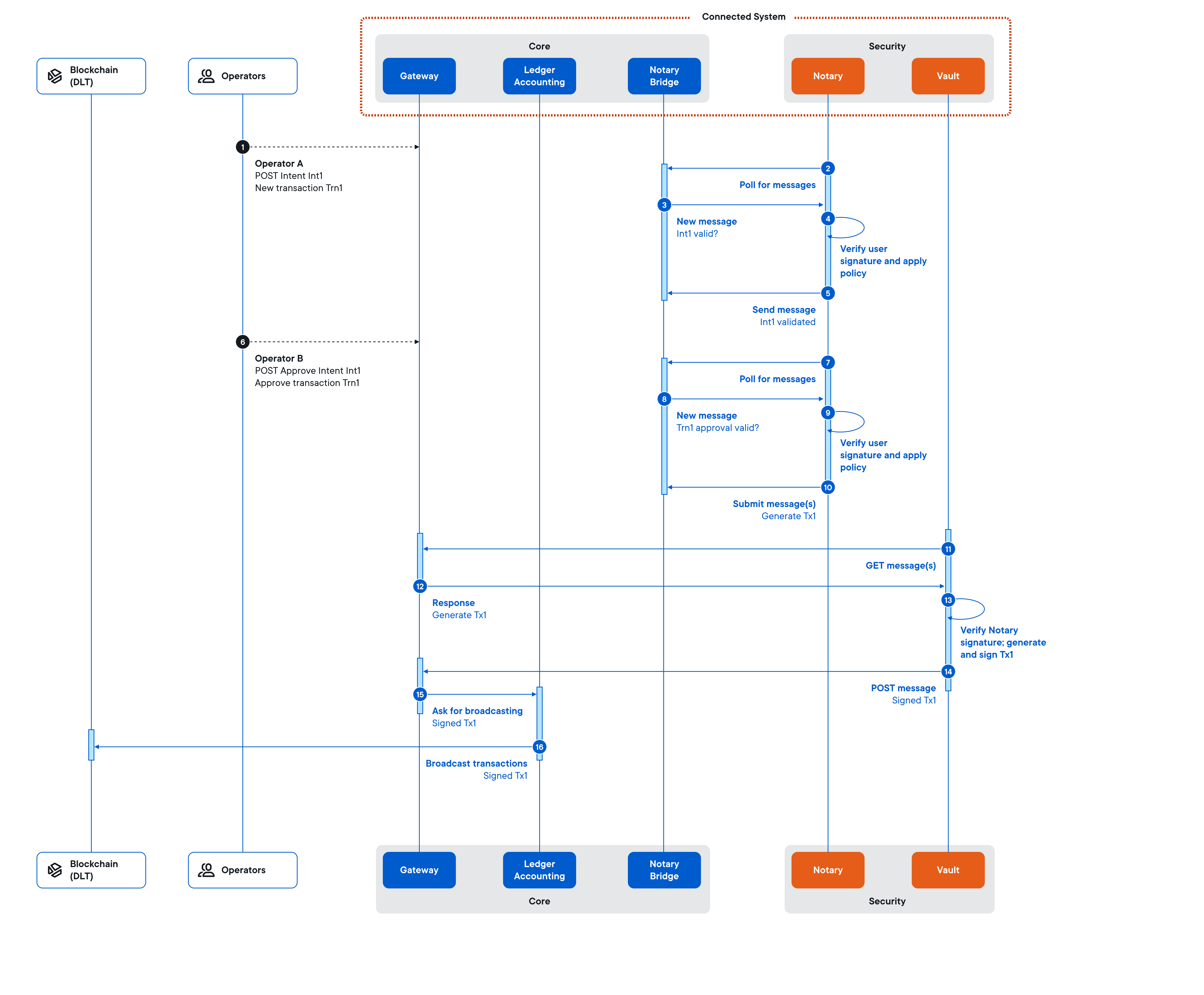
| Step | Component | Description | What's happening |
|---|---|---|---|
| 1 | Operator → API | Operator 1 submits a signed intent containing transaction data via HTTPS POST to the API gateway. | A user requests a transaction. |
| 2 | Governance → notary | The governance engine polls the notary bridge for new messages via gRPC stream. | The system checks for new requests. |
| 3 | notary → Governance | The notary bridge returns the signed intent. | The request is passed to governance. |
| 4 | Governance | The governance engine verifies the user signature and applies the related policy. | The system checks if this user can make this request. |
| 5 | Governance → notary | The governance engine submits the validated intent to the notary bridge. | The request is queued for approval. |
| 6 | Operator → API | Operator 2 approves the transaction via HTTPS POST to the API gateway. | Another user approves the transaction. |
| 7 | Governance → notary | The governance engine polls the notary bridge for approval messages. | The system checks for approvals. |
| 8 | notary → Governance | The notary bridge returns the signed approval. | The approval is passed to governance. |
| 9 | Governance | The governance engine verifies the approval. With all required approvals, it generates and signs an operation query for the vault. | All approvals received — ready for signing. |
| 10 | Governance → notary | The governance engine submits the signed operation query to the notary bridge. | The transaction is sent to the vault for signing. |
| Step | Component | Description | What's happening |
|---|---|---|---|
| 11 | vault → API | The vault polls the API gateway for new operation queries via HTTPS GET. | The vault checks for transactions to sign. |
| 12 | API → vault | The API gateway returns the signed operation query. | The vault receives the transaction. |
| 13 | vault | The vault verifies the governance signature, builds the transaction, and signs it. | The vault signs the transaction with the private key. |
| 14 | vault → API | The vault submits the signed transaction via HTTPS POST. | The signed transaction is returned. |
| 15 | API → Ledger Service | The API gateway requests the ledger accounting service to broadcast. | The system prepares to send to blockchain. |
| 16 | Ledger Service → Blockchain | The signed transaction is broadcast to the blockchain. | Your transaction is sent to the blockchain network. |
In a cold vault deployment, steps 11-16 are replaced by a manual process involving an operator who physically transfers data between the online system and the air-gapped vault.
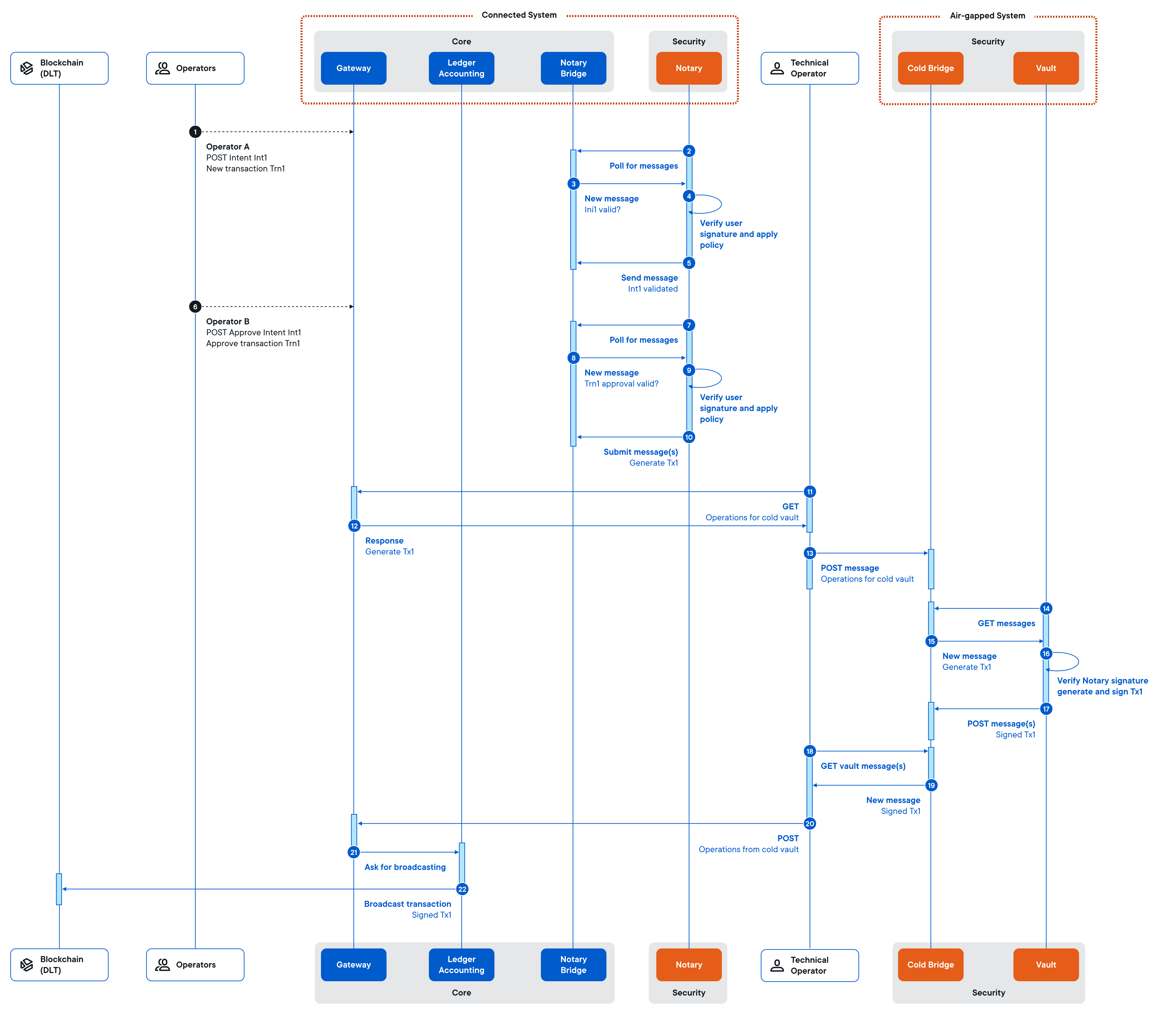
| Step | Component | Description | What's happening |
|---|---|---|---|
| 11 | Operator → API | The cold vault operator requests pending operations from the API gateway. | An operator downloads the transaction request. |
| 12 | API → Operator | The API gateway returns the signed operation query. | The operator receives the transaction data. |
| 13 | Operator → Cold Bridge | The operator physically moves to the air-gapped system and submits the operation query to the cold bridge. | The operator walks to the secure room with the cold vault. |
| 14 | vault → Cold Bridge | The vault polls the cold bridge for new operation queries. | The cold vault checks for transactions to sign. |
| 15 | Cold Bridge → vault | The cold bridge returns the signed operation query. | The cold vault receives the transaction. |
| 16 | vault | The vault verifies the governance signature, builds the transaction, and signs it. | The cold vault signs with the private key. |
| 17 | vault → Cold Bridge | The vault submits the signed transaction to the cold bridge. | The signed transaction is ready for pickup. |
| 18-19 | Operator → Cold Bridge | The operator retrieves the signed transaction from the cold bridge. | The operator downloads the signed transaction. |
| 20 | Operator → API | The operator physically moves back and submits the signed transaction to the API gateway. | The operator returns and uploads the signed transaction. |
| 21 | API → Ledger Service | The API gateway requests the ledger accounting service to broadcast. | The system prepares to send to blockchain. |
| 22 | Ledger Service → Blockchain | The signed transaction is broadcast to the blockchain. | Your transaction is sent to the blockchain network. |
| Factor | Hot vault | Cold vault |
|---|---|---|
| Security | Network-connected (higher attack surface) | Air-gapped (maximum isolation) |
| Transaction speed | Seconds to minutes | Hours to days (manual process) |
| Automation | Fully automated | Requires operator intervention |
| Use case | Frequent transactions, trading, payments | Large treasury reserves, cold storage |
| Operational cost | Lower (no manual steps) | Higher (dedicated operators, physical security) |
Use a hybrid approach: maintain a hot vault for operational liquidity (daily transactions) and a cold vault for long-term reserves. Set governance policies that require cold vault signing for transactions above a threshold amount.
When you transact on a ledger, the fees you pay are a combination of the fees set by the ledger itself and a strategy you specify in Ripple Custody to trade off priority against cost.
At transaction execution, Ripple Custody calculates the fee by calling the dry run operation, then adjusts based on your fee strategy and ledger requirements. For more information, see Dry run intents (UI) or Dry run intents (API).
Ripple Custody makes a safe, deliberately high estimate of an operation's cost to ensure the operation gets confirmed. On some ledgers and for some operation types — for example, smart contract interactions on Ethereum or TRON — the final fee depends on external factors such as network congestion, so the estimated fee represents the highest fee the operation might pay rather than the exact cost. The final fee is only known once the transaction is confirmed on chain. This is expected protocol behavior, not an error or a limitation.
Ripple Custody supports several fee strategy types:
| Type | Description |
|---|---|
| Priority | Fee calculated based on priority level (Low, Medium, High). Required for transfer orders. |
| Specified rate | You specify the exact fee rate. EIP 1559 variant available for Ethereum. |
| Specified additional fee | Your specified amount added on top of the ledger base fee. |
| Predefined | The ledger calculates fees using its own criteria (e.g., Hedera). |
| Beneficiary pays | The recipient pays the transaction fees. |
Set a maximum fee as a safeguard to cap transaction costs. If network fees exceed your maximum, Ripple Custody holds the transaction in Preparing status until conditions improve.
For detailed fee strategies by ledger, see Transactions reference.
Transaction finality is the point at which a blockchain transaction becomes irreversible. Ripple Custody implements probabilistic finality, treating transactions as confirmed after a sufficient number of blocks.
Different blockchains require different confirmation thresholds:
| Category | Examples | Confirmation Blocks |
|---|---|---|
| Fast finality | XRP Ledger, Stellar, Algorand, Hedera, Avalanche, Polkadot | 1 |
| Medium finality | Bitcoin, Dash, Cardano, Tezos, Solana | 2-31 |
| High confirmation | Ethereum, BSC, Polygon | 96-200 |
For complete finality settings by network, see Transactions reference.
- Transactions reference - Detailed fee and finality tables, troubleshooting
- System architecture - Learn about notary, vault, and other components
- Send assets: UI | API - Guide for creating transactions