In this tutorial you'll learn how to trade XRP fungible tokens in the Decentralized Exchange (DEX) with Ripple Custody.
By the end of this tutorial, you should be able to:
- Create an offer for fungible tokens on the DEX.
- Match an offer on the DEX to complete a trade.
Ripple Custody trades on the DEX by creating an immediate-or-cancel or fill-or-kill offer, both of which must immediately match an offer that already exists on the DEX.
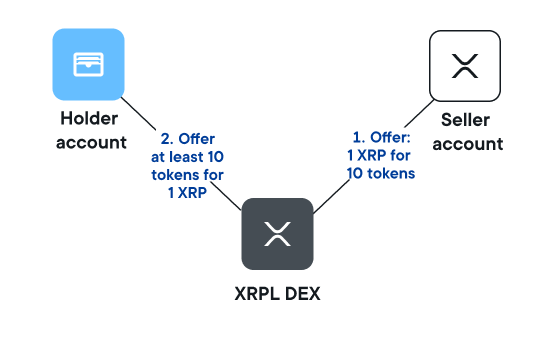
For example:
- A seller account creates an offer of 1 XRP for 10 tokens.
- A token holder account creates an offer of 11 tokens for 1 XRP.
The image below shows this trade:
The workflow to trade fungible tokens on the DEX is as follows:
Create a seller offer — Create an offer from a seller account on the DEX.
Create a matching buyer offer — Create an offer from another account that matches the seller offer.
View the transaction details — Check the details of the transaction and associated transfer.
Before you begin, we recommend you read the Issue fungible tokens on the XRP Ledger tutorial.
For this tutorial, you will need:
A fungible token to trade. In this tutorial we'll use a token asset called KBO.
An external Seller account, with a balance of XRP native currency.
A Ripple Custody token Holder account, with a balance of XRP native currency and some KBO tokens issued from an issuer account.
For more information on how to create and hold tokens in an account, see the Issue fungible tokens on the XRP Ledger tutorial.
A trust line between the holder account and the account that issued the tokens. This can be the same as the seller account, but it can also be a different account. For more information, see Link the issuer and holder accounts with a trust line.
For more information on how to:
- Create and fund Ripple Custody accounts, see Create and fund accounts.
- Fund external accounts, see Fund external accounts.
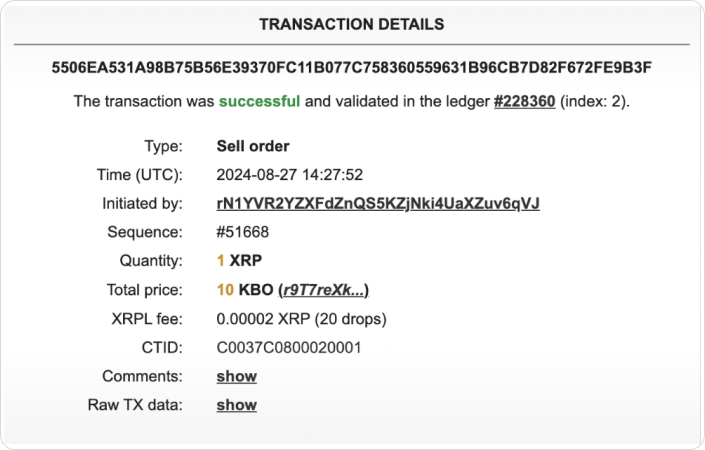
Create an offer on the DEX of 1 XRP for 10 KBO from a seller account. Since this is an external account, you need to create the offer using OfferCreate from the seller environment.
For more information, see Trade in the Decentralized Exchange in the XRPL documentation.
The offer is now available on the XRP Ledger:
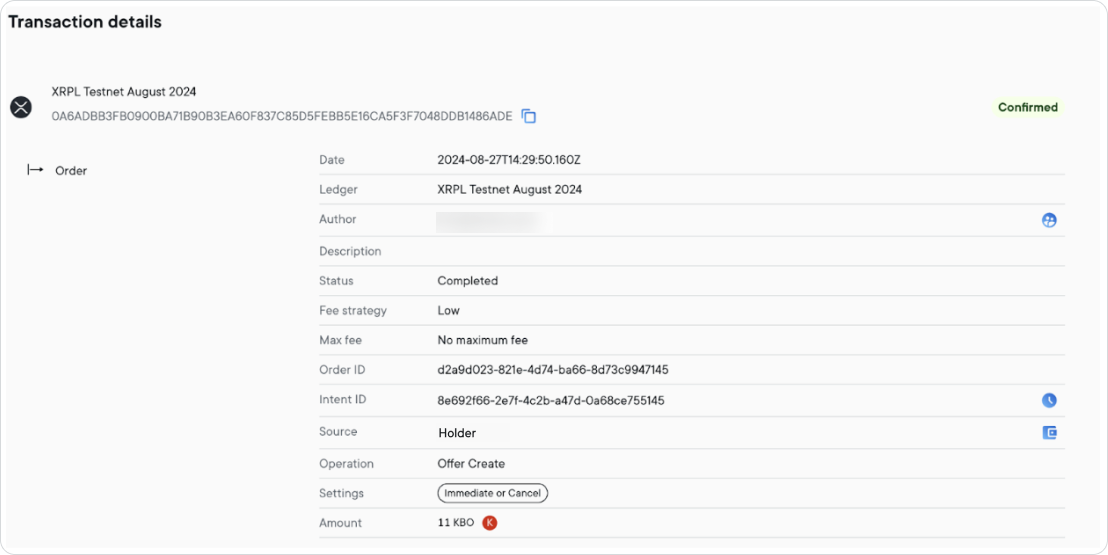
Create a matching offer in Ripple Custody from Holder using a transaction order. The offer is 11 KBO for 1 XRP.
To create an offer:
With the UI, see Ripple Custody UI > Create an offer to trade on the DEX.
The transaction order details are as follows: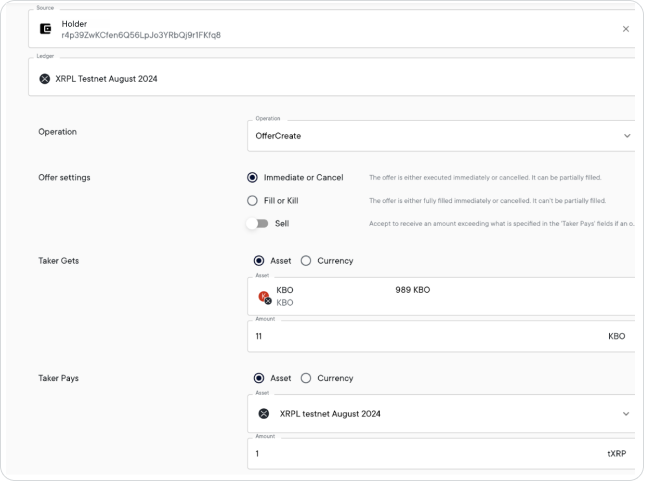
With the API, see Ripple Custody API > Create an offer to trade on the DEX.
The payload details are as follows:Payload example{ "payload": { "id": "58129d8f-3ff4-4696-8cab-0d649634fbde", "ledgerId": "xrpl-testnet-august-2024", "accountId": "29ef6ffe-e24e-474f-ad00-17cd2e016b6b", "parameters": { "operation": { "type": "OfferCreate", "flags": [ "tfImmediateOrCancel" ], "takerGets": { "amount": "11000000000000000000000000000000000000000000000000000000000000000000000000000000000", "currency": { "type": "TickerId", "tickerId": "13aac11d-7cfe-481a-8082-8e663eee60bd" } }, "takerPays": { "amount": "1000000" } }, "memos": [], "feeStrategy": { "priority": "Low", "type": "Priority" }, "type": "XRPL" }, "description": null, "customProperties": {}, "type": "v0_CreateTransactionOrder" } }
Since the offer of 11 KBO is higher than the amount sought by the seller, the offer matches successfully and the trade goes ahead.
To see details of the confirmed transaction and associated objects in Ripple Custody:
- With the UI, see Ripple Custody UI > View transactions
- With the API, see Ripple Custody API > View transactions
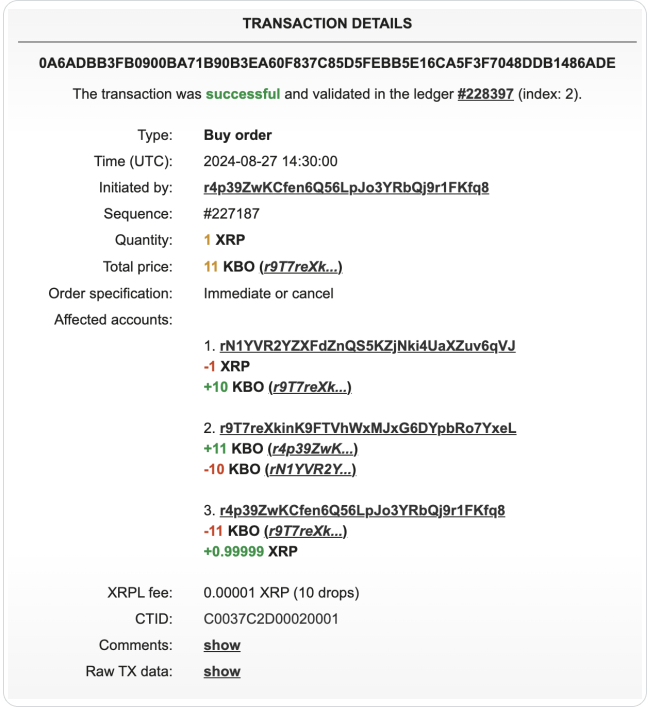
The transaction details are as follows:
With the transfer of 1 XRP:

The ledger shows the transaction executed successfully: